

Overview
Use this integration to capture Cursor cloud-agent activity and upload each session log to your own Google Cloud Storage or Amazon S3 bucket. It is meant for testing cloud-agent telemetry without running a hosted Asymptote backend. This flow depends on the Beacon CLI. You runbeacon cloud commands from your
workstation to create the object-storage upload path, generate project hooks to
commit to your repository, and generate the setup script that installs Beacon
binaries in the Cursor cloud sandbox.
If you’re interested in leveraging this telemetry ingest across your
enterprise, Asymptote Managed is designed for
production cloud-agent telemetry ingest at scale.
How it works
Cursor Cloud Agents run in Cursor’s cloud environment, so Beacon cannot use the long-running endpoint agent that local installs use. Instead, commit project-level Cursor hooks to.cursor/hooks.json and use the setup script to
install Beacon binaries in the sandbox. During a cloud-agent session, those
hooks write /tmp/beacon/runtime.jsonl; Beacon refreshes the corresponding GCS
or S3 object as supported Cursor hook events run.
The setup has four parts:
- Create a dedicated GCS or S3 upload path with Beacon.
- Add Beacon cloud telemetry environment variables to the Cursor cloud environment.
- Commit Beacon’s project-level Cursor hooks to
.cursor/hooks.json. - Run a Beacon-generated setup script inside the Cursor cloud environment to
install
/tmp/beacon/bin/beaconand/tmp/beacon/bin/beacon-hooks.
conversation_id hook field as the default run_id for
Cursor Cloud telemetry. If you set BEACON_RUN_ID yourself, Beacon preserves
that value instead.
Prerequisites
- Beacon CLI
v1.0.3or later for direct S3 upload. Cursor Cloud prompt capture requires the branch containing this change until a release includes it. - For GCS:
gcloudinstalled and authenticated to a project where you can create buckets, service accounts, IAM bindings, and service account keys. - For S3: AWS CLI installed and authenticated to an account where you can create buckets, IAM users, inline policies, and access keys.
jqon the verification workstation.- Cursor Cloud Agent access for the repository you want to test.
- A Cursor cloud environment with outbound access to:
oauth2.googleapis.comstorage.googleapis.coms3.<region>.amazonaws.comgithub.com*.githubusercontent.com
gcloud and select your project:
1. Create the object storage upload path
Choose GCS or S3 for the cloud-agent session logs.GCS
From your workstation, choose a bucket and prefix: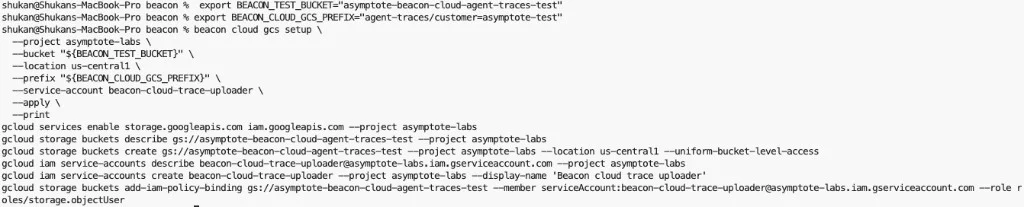
Review the bucket, service account, and IAM commands before applying them.
BEACON_CLOUD_GCS_CREDENTIALS_B64 anywhere you
share screenshots or logs.
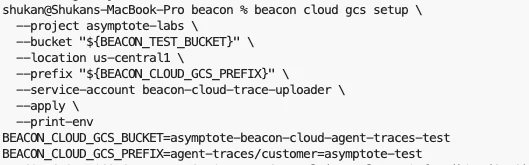
Copy the printed BEACON_CLOUD_GCS_* variables into the Cursor cloud environment.
S3
From your workstation, choose a bucket, region, and prefix:s3:PutObject only under
the selected bucket prefix.
Copy the printed values. Treat AWS_ACCESS_KEY_ID and
AWS_SECRET_ACCESS_KEY as sensitive and redact them from screenshots and logs.
2. Configure Cursor Cloud Agents
Open your Cursor Cloud Agent environment for the repository. Add these environment variables: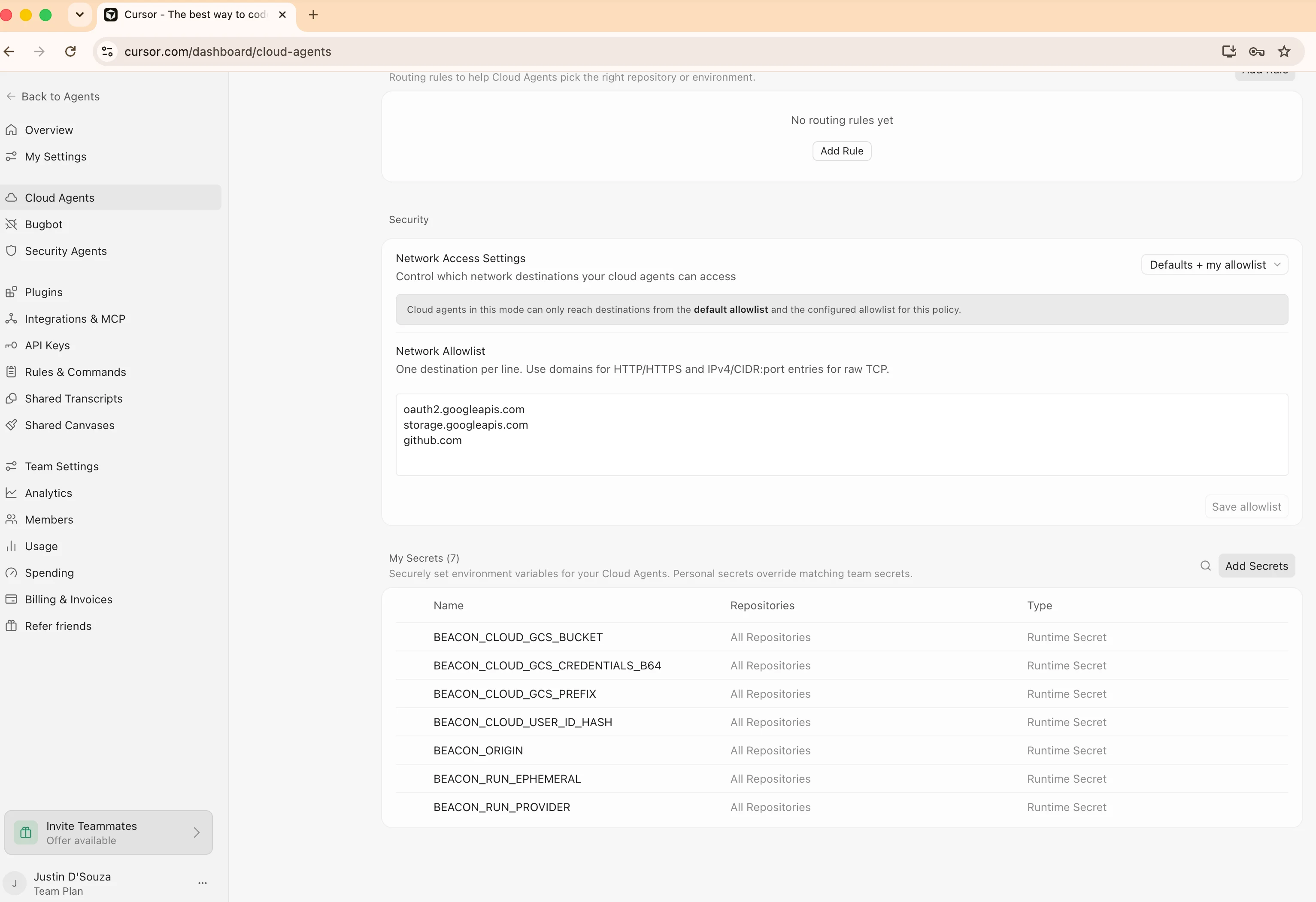
Configure network access and Beacon runtime secrets for Cursor Cloud Agents.
3. Commit Cursor project hooks
Cursor Cloud Agents load project hooks from.cursor/hooks.json at repository
checkout and task start. Generate the hook file locally, commit it, and push it
before starting cloud agents:
4. Add the setup script
Generate the setup script for your Beacon release:vX.Y.Z with a release tag that contains Cursor Cloud prompt capture.
Until that release exists, use the source-build path below; v1.0.3 supports
direct S3 upload but predates the prompt hook.
Paste the generated script into the Cursor cloud environment setup step. The
script:
- installs
beaconandbeacon-hooksin/tmp/beacon/bin, - does not modify
.cursor/hooks.json, - expects project hooks to already be committed in the repository.
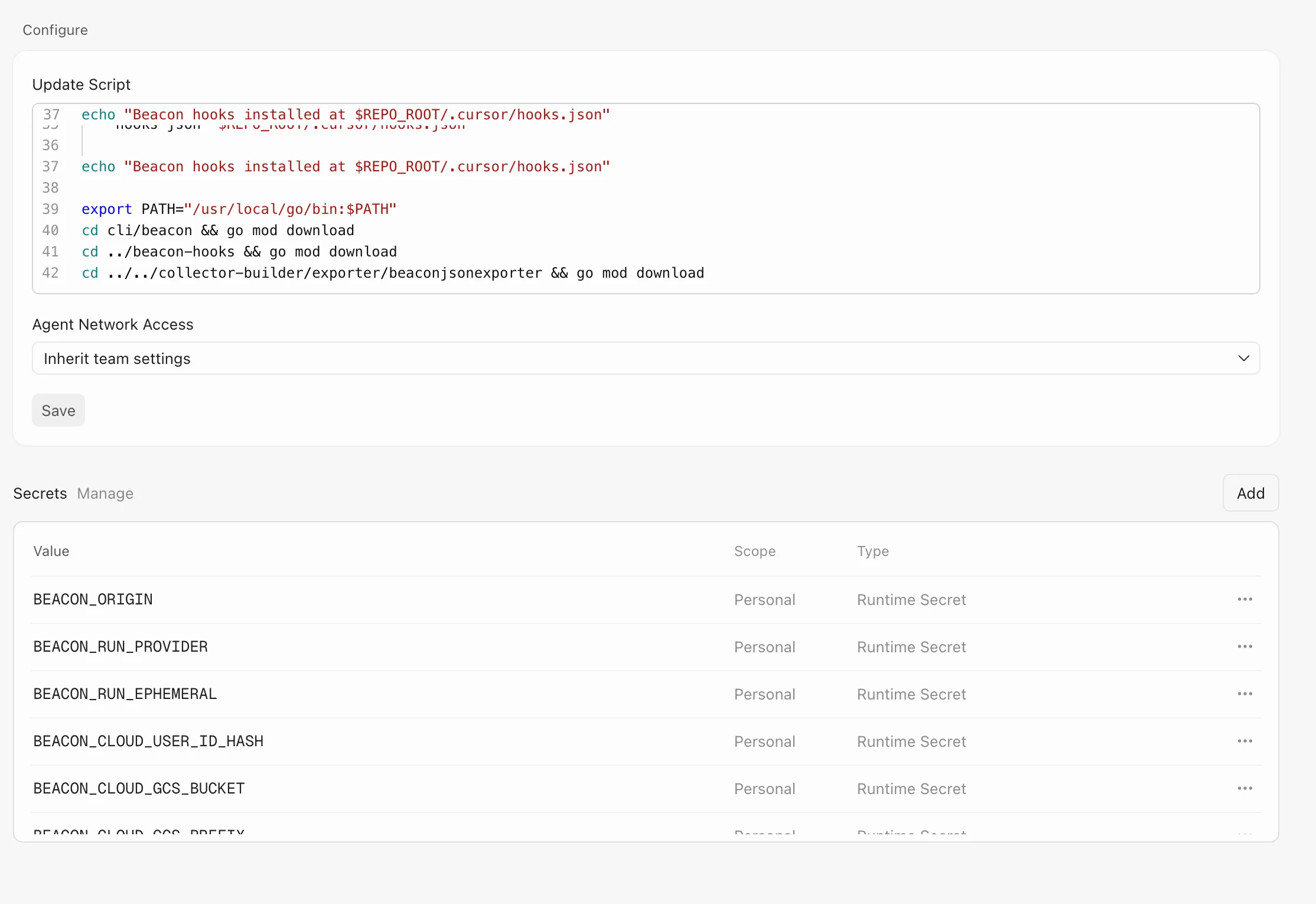
Paste the generated Beacon setup script into the Cursor cloud environment update script.
5. Run a cloud agent task
Start a Cursor cloud agent task that uses tools so the environment becomes writable and project hooks become active. For example:Beacon captures prompt text through Cursor Cloud’s
beforeSubmitPrompt
project hook and uploads that event immediately. Commit .cursor/hooks.json
before starting the run so the prompt hook is available when the cloud
environment starts. Cursor can perform early read-only or bootstrap work
before project hooks become active, so the initial launch prompt may be
absent; follow-up prompts are captured once hooks are running.
sessionStart and sessionEnd remain unavailable. See
Cursor’s Cloud Agent hook support matrix
for the current platform support list.6. Verify object storage upload
For GCS, list the uploaded session objects: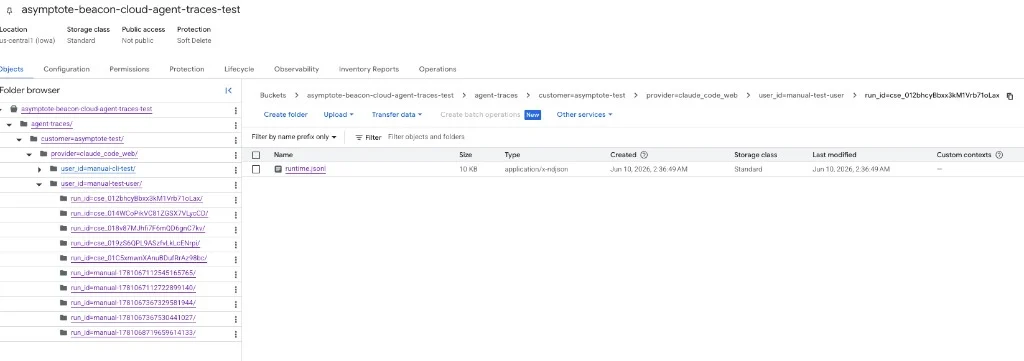
Beacon uploads one readable runtime.jsonl object per Cursor cloud agent session.
Security note
The self-serve flows create a dedicated GCS service account or AWS IAM user scoped to object uploads, then store its credentials in the Cursor cloud environment. This is useful for proof-of-concept testing, but treat those environment variables as sensitive credentials. Store credential values as Cursor Runtime Secrets, avoid broad credentials, rotate test keys after use, and review access before using this flow with sensitive telemetry.Troubleshooting
The bucket is empty
Confirm the Cursor setup script ran and installed binaries, and confirm the repository checkout includes committed project hooks:runtime.jsonl exists but object storage is empty, check network access and
credentials. The cloud sandbox must reach the GCS OAuth/storage endpoints or
the regional S3 endpoint selected by BEACON_CLOUD_UPLOAD=s3.
If runtime.jsonl does not exist, confirm the task used a Cursor Cloud
supported hook surface such as prompt submission, a file read, shell command,
file edit, tool use, subagent event, or compaction event. Cursor documents the
supported and unsupported cloud hooks in
its Cloud Agent hook support matrix.
Cursor tries to commit hook settings
The setup script should not modify.cursor/hooks.json. If a cloud agent shows
changes to .cursor/hooks.json, update the setup script to v0.0.56 or later
and remove older commands that ran beacon cloud cursor install-hooks inside
the VM.
Related
Cursor runtime support
Review local Cursor telemetry through Beacon-managed hooks.
Log forwarding
Compare direct cloud-agent uploads with local endpoint object-storage forwarding.
Asymptote Managed
Use managed secure ingest for production enterprise cloud-agent telemetry.
Agent Beacon on GitHub
Request new cloud-agent destinations or contribute support.