

Overview
Use this integration to capture Claude Code cloud-agent activity and send each session log to one of three places: Asymptote Managed, where it appears in your dashboard next to your laptops’ sessions, or a Google Cloud Storage or Amazon S3 bucket you own. This flow depends on the Beacon CLI. You runbeacon cloud commands from your
workstation to create a bucket upload path if you want one, print Claude
environment variables, and generate the setup script that runs inside the Claude
cloud sandbox.
How it works
Claude Code Cloud Agents run in Anthropic’s cloud environment, so Beacon cannot use the long-running endpoint agent that local installs use. Instead, the setup script installs Beacon hooks inside the sandbox. During a cloud-agent session, those hooks write/tmp/beacon/runtime.jsonl. When the agent stops, Beacon
ships that file: to Asymptote Managed it posts the new lines to the same ingest
endpoint the laptop forwarder uses, so the session shows up in the dashboard a
minute or two later; to a bucket it uploads the whole file as one object.
The setup has three parts:
- Get a device key from Asymptote, or create a GCS or S3 upload path with Beacon.
- Add Beacon cloud telemetry environment variables to the Claude Code cloud environment.
- Paste a Beacon-generated setup script into the Claude cloud environment.
Prerequisites
- Beacon CLI
v0.0.51or later. - For GCS:
gcloudinstalled and authenticated to the Google Cloud project you will use for telemetry storage. - For S3: AWS CLI installed and authenticated to an AWS account where you can create buckets, IAM users, inline IAM policies, and access keys.
- Claude Code cloud agent access for the repository you want to test.
- A Claude cloud environment with outbound access to:
- For Asymptote Managed: the ingest host from your device key hand-off
(currently
beacon-ingest-gulcylfs4a-uw.a.run.app) - For GCS:
oauth2.googleapis.comandstorage.googleapis.com - For S3:
s3.<region>.amazonaws.com github.com*.githubusercontent.com
- For Asymptote Managed: the ingest host from your device key hand-off
(currently
gcloud and select your project:
1. Create the upload path
Choose Asymptote Managed, GCS, or S3 for the cloud-agent session logs.Asymptote Managed
A cloud sandbox has no browser and no Vector, so it cannot runbeacon endpoint connect. Instead it authenticates with
a device key that an Asymptote operator mints for the environment itself: one
key per cloud environment, bound to your organization, listed on
/dashboard/endpoints like any laptop and revocable from there. Ask your
Asymptote contact for a key, naming the environment (for example
“Claude Code web, acme/frontend”). You receive three values to put in the
environment in step 2: BEACON_CLOUD_UPLOAD=asymptote, the ingest URL, and the
key itself. Self-serve headless enrollment is on the roadmap.
GCS
From your workstation, choose a bucket and prefix: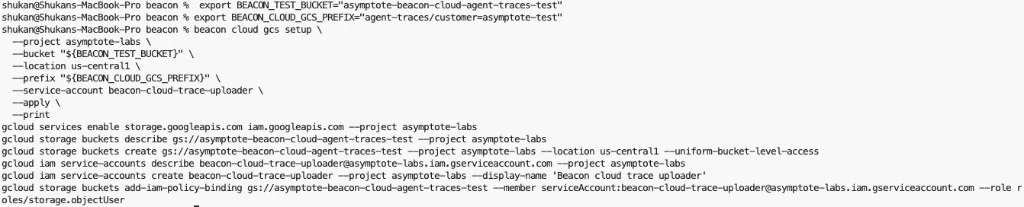
Review the bucket, service account, and IAM commands before applying them.
BEACON_CLOUD_GCS_CREDENTIALS_B64 anywhere you
share screenshots or logs.
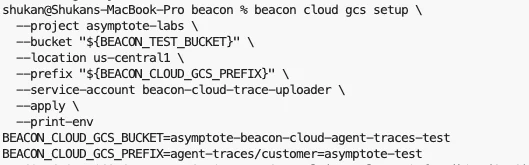
Copy the printed BEACON_CLOUD_GCS_* variables into the Claude cloud environment.
S3
From your workstation, choose a bucket, region, and prefix:AWS_ACCESS_KEY_ID and
AWS_SECRET_ACCESS_KEY anywhere you share screenshots or logs.
The helper creates a dedicated IAM user and grants it s3:PutObject only under
the selected bucket prefix.
2. Configure Claude Code Cloud Agents
Open the Claude Code web application and select the cloud environment for your repository.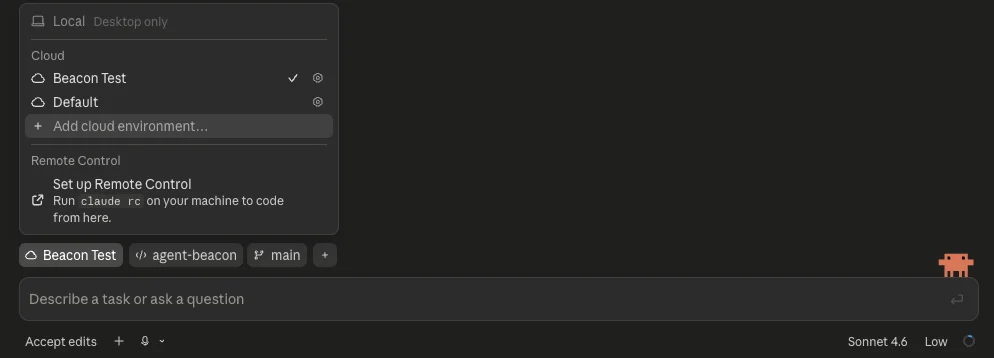
Select or create the Claude cloud environment that should run Beacon telemetry hooks.
oauth2.googleapis.com and storage.googleapis.com instead of
the ingest host; for S3, allow s3.<region>.amazonaws.com.
Add these common environment variables:
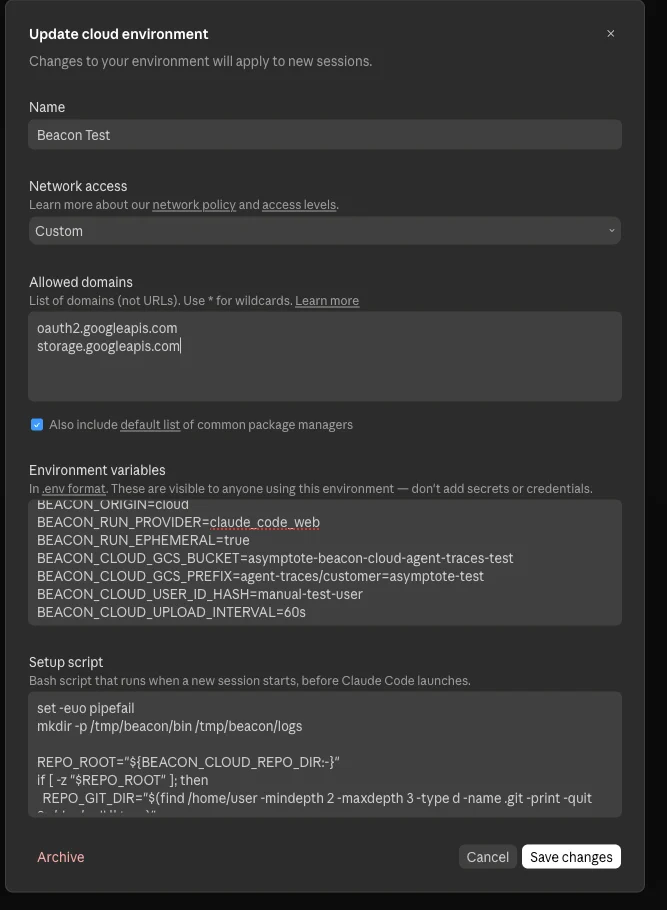
Configure network access, Beacon metadata, GCS bucket settings, and the setup script in the Claude cloud environment.
3. Add the setup script
Generate the setup script for your Beacon release:- installs
beaconandbeacon-hooksin/tmp/beacon/bin, - finds the cloud sandbox repository root,
- writes
.claude/settings.local.jsoninside the sandbox clone, - excludes generated Claude settings from git commits.
4. Run a cloud agent task
Start a Claude Code cloud agent task that uses tools. You can start the task from the Claude app on your phone or from the Claude Code web application. For example: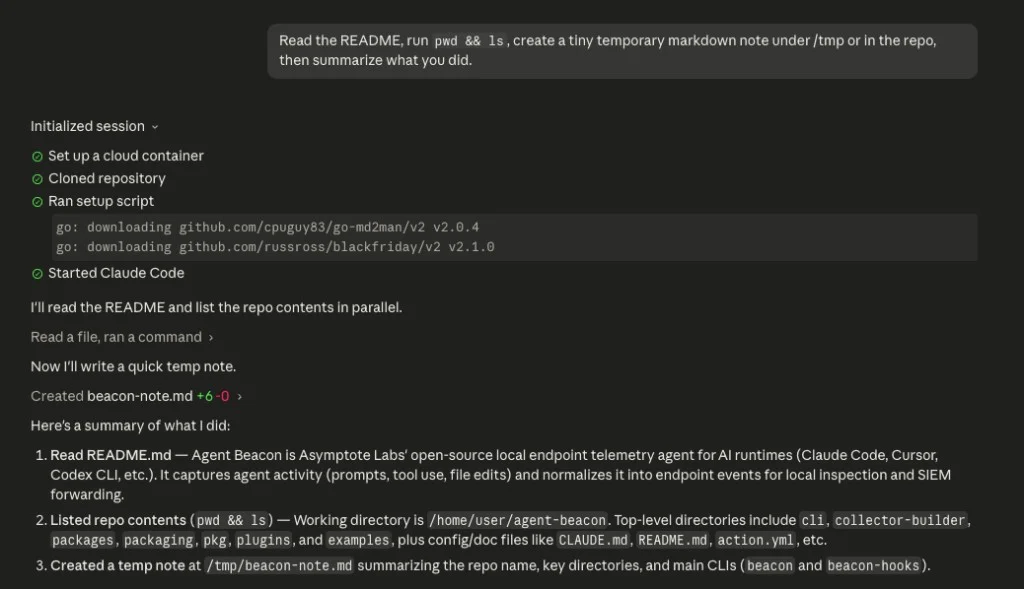
A successful Claude Code cloud agent session runs the setup script, starts Claude Code, and produces normal agent activity.
5. Verify upload
For Asymptote Managed, open/dashboard/endpoints: the cloud environment’s
device shows a fresh last seen time as soon as the first batch is accepted,
and the session appears on /dashboard/telemetry within a couple of minutes,
with run.provider=claude_code_web and the Claude session id as the run id.
To check the key itself from your workstation:
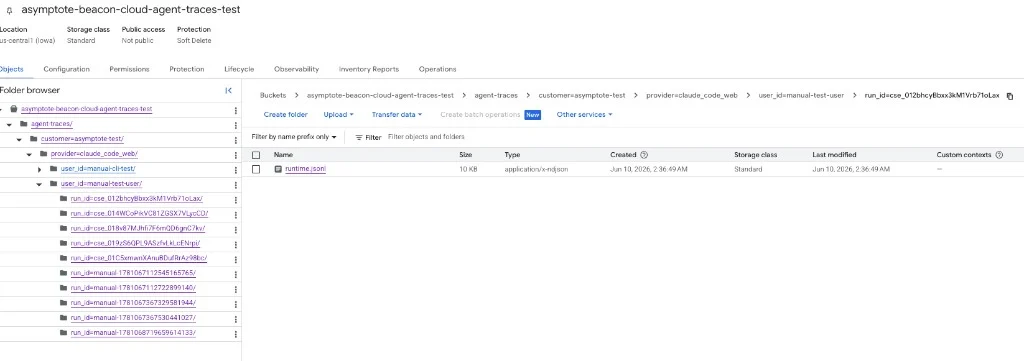
Beacon uploads one readable runtime.jsonl object per Claude Code cloud agent session.
Security note
The Asymptote Managed flow puts a per-device key in the Claude Code environment. It can only append telemetry to your organization’s ingest stream; it reads nothing and grants no dashboard access, and revoking the device on/dashboard/endpoints stops it within a minute. This is the one place a Beacon
device key lives in an environment variable: a sandbox has no keychain and no
secrets file to hold it, unlike a laptop, where the key stays in a 0600 file.
The self-serve GCS flow above creates a dedicated service account scoped to
object uploads for one bucket. The S3 flow creates a dedicated IAM user scoped
to s3:PutObject under one prefix. All three flows store credentials in the
Claude Code environment, so treat those environment variables as sensitive
credentials.
Claude notes that cloud environment variables are visible to users of that
environment and recommends avoiding secrets there when possible. Avoid broad
credentials, rotate or delete the generated key after testing, and review access
before using this flow with sensitive telemetry.
Troubleshooting
Nothing reaches the dashboard
Run the health check from step 5. A401 means the key was revoked or the
approver left the organization; ask for a new key. A 200 with no sessions
usually means the ingest host is not in the environment’s allowed network
domains, or the Stop hook did not run (the upload happens on Stop and
SessionEnd). Beacon logs upload failures to the hook log with the HTTP status.
The bucket is empty
Confirm the Claude setup script ran and generated hooks:runtime.jsonl exists but object storage is empty, check network access and
credentials. The cloud sandbox must reach either the GCS OAuth/storage endpoints
or the regional S3 endpoint you configured.
Claude tries to commit hook settings
The setup script should write.claude/settings.local.json, not
.claude/settings.json. settings.local.json is intended for local or
sandbox-specific configuration and should stay out of commits.
Related
Claude Code runtime support
Review local Claude Code telemetry through OTLP and hooks.
Log forwarding
Review local endpoint S3 forwarding for persistent endpoint deployments.
Asymptote Managed
Use managed secure ingest for production enterprise cloud-agent telemetry.
Agent Beacon on GitHub
Request new cloud-agent destinations or contribute support.