

Overview
MCP server inventory helps explain which local agent configuration files reference Model Context Protocol servers and where those references came from. Use it to review the tool surface an agent may be able to call from local configuration:- Expected MCP servers that should be present after workstation setup.
- Unexpected MCP servers on sensitive endpoints or repositories.
- Server references introduced by user-level, project-level, or runtime-specific config.
- User-mode versus system-mode differences when Beacon reads different endpoint paths and runtime logs.
~/.claude.json; project-scoped servers may also appear in project MCP/config files. For Cursor, Beacon inspects user and project mcp.json files.
Run MCP inventory
Start with the full inventory report when reviewing MCP server configuration alongside harness and skill state:Show MCP server inventory
Export MCP server inventory
Review system-mode inventory
Expected versus unexpected servers
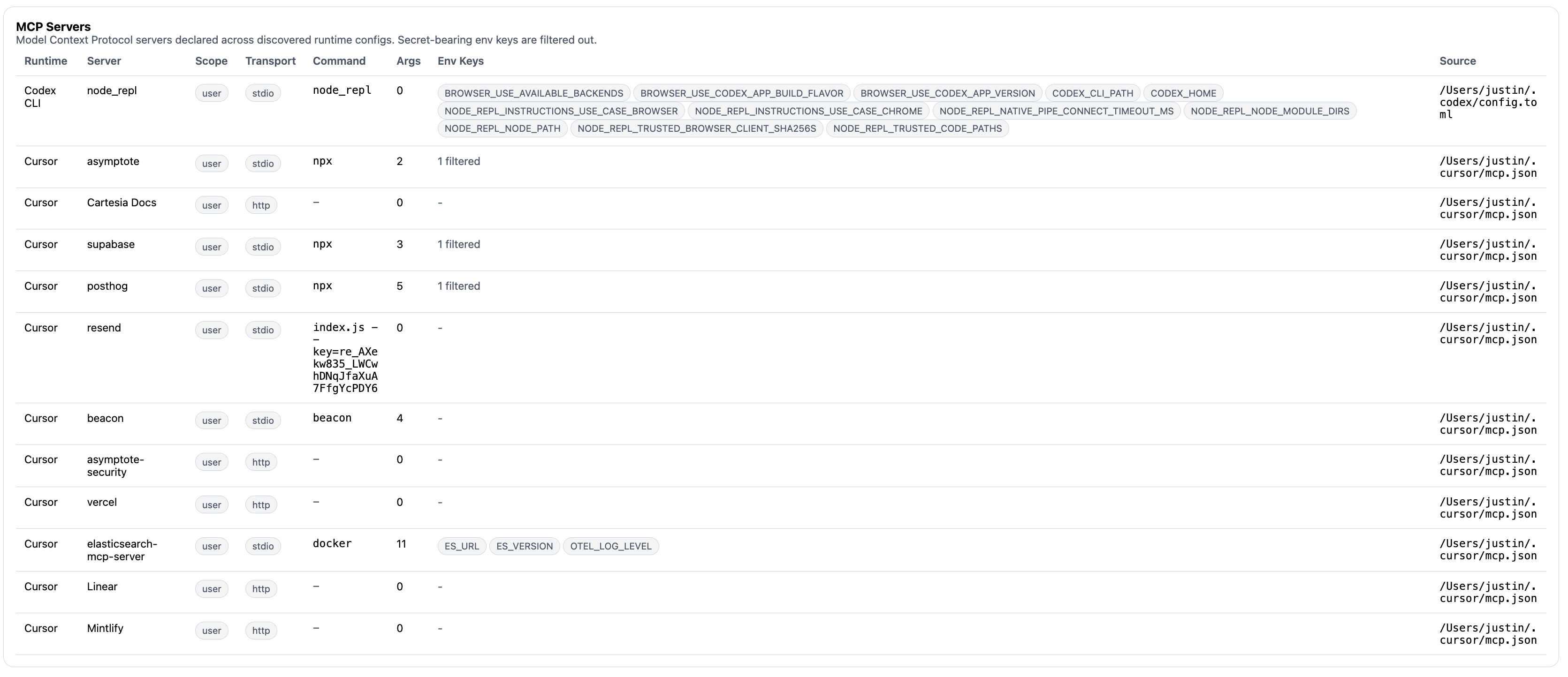
Review MCP server inventory to see configured servers, source paths, scopes, and runtime context.
- Is the server expected for this user, repository, or managed workstation profile?
- Did the server come from a user config or a project config that may travel with source code?
- Does the server expose filesystem, shell, browser, ticketing, messaging, or credential-adjacent tools?
- Is the server present in config but absent from recent observed activity?
- Are there recent
mcpendpoint events that show the server or tool being used?
Beacon MCP is separate
Thebeacon mcp command group exposes local Beacon activity to MCP clients. That is different from inventorying third-party MCP servers referenced by agent configs.
Use beacon mcp doctor to validate Beacon’s own local MCP server before connecting a client:
Validate Beacon MCP
Related
Inventory Overview
Return to the Inventory landing page and command walkthrough.
beacon endpoint inventory
Review inventory flags and JSON output behavior.
beacon mcp
Review Beacon’s local MCP command group.
beacon mcp doctor
Validate local Beacon MCP setup.
Test MCP Access
Connect Cursor or Claude Code to Beacon MCP for local testing.