

Integration command
VS Code Copilot Chat can export OpenTelemetry to Beacon’s local collector. Beacon can configure VS Code user settings, show integration status, and validate whether VS Code-derived events are arriving in the runtime log.Command syntax
Commands
print-config
Print VS Code Copilot OTel setup guidance.
setup
Configure VS Code Copilot OTel settings.
status
Show VS Code endpoint integration status.
validate
Validate whether VS Code events are arriving.
Recommended setup
Use the endpoint harness path for first-time setup:Use the endpoint harness path for first-time setup
http://127.0.0.1:4318. Reload VS Code after setup.
Validate recent events:
Validate recent events
Optional hooks
VS Code hooks are currently in preview and may be disabled by organization policy. Use hooks only when you want additional lifecycle/tool detail or cross-agent coverage beyond Copilot’s OTel stream. Before installing hooks, confirmChat: Use Hooks is enabled in VS Code settings. Chat: Use Claude Hooks is not enough for Copilot-format .github/hooks/*.json files. If Chat: Use Hooks is unchecked and managed by your organization, VS Code will not execute Beacon’s VS Code hook file.
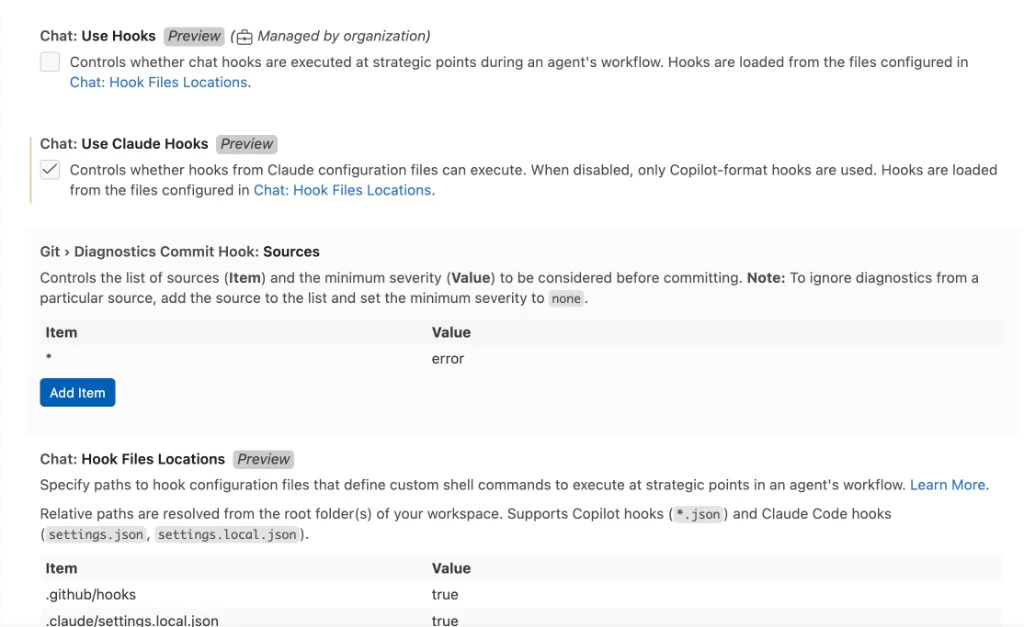
Install runtime hooks
harness.name=vscode. OTel-derived events use harness.name=vscode_copilot.
Flags
beacon endpoint integrations vscode setup
beacon endpoint integrations vscode setup writes VS Code Copilot OTel settings without reinstalling the endpoint collector.
Set up the integration
beacon endpoint install --harness vscode for first-time setup because it configures both the collector and VS Code settings.
beacon endpoint integrations vscode status
beacon endpoint integrations vscode status reports whether VS Code is detected, whether Copilot OTel settings point to Beacon, and whether VS Code events have been observed.
Check status
Print status as JSON
beacon endpoint integrations vscode validate
beacon endpoint integrations vscode validate checks whether VS Code OTel or hook-derived events have arrived in the endpoint runtime log.
Run the validation check
Related
VS Code runtime support
Review collection paths and telemetry coverage.
Endpoint install
Install and configure the local endpoint collector.
Runtime hooks
Install optional hook-based telemetry where supported.
Agent harness integration model
See how Beacon discovers and configures supported runtimes.