

Runtime overview
Asymptote supports VS Code primarily through GitHub Copilot Chat OpenTelemetry export to Asymptote’s localhost collector. VS Code hooks are also supported as an optional preview path when your organization allows them.Prerequisites
Before enabling VS Code telemetry, make sure:- Visual Studio Code is installed for the user.
- GitHub Copilot Chat is installed and available in VS Code.
beacon endpoint installcan start the local collector and write the runtime log.- Your team has reviewed content handling and destination access for prompt and tool telemetry.
Recommended collection path
Use OpenTelemetry as the primary VS Code collection path:Use OpenTelemetry as the primary VS Code collection path
http://127.0.0.1:4318. Reload VS Code after setup so the Copilot extension reinitializes its telemetry configuration.
Validate recent activity:
Validate recent activity
harness.name=vscode_copilot.
Optional hook path
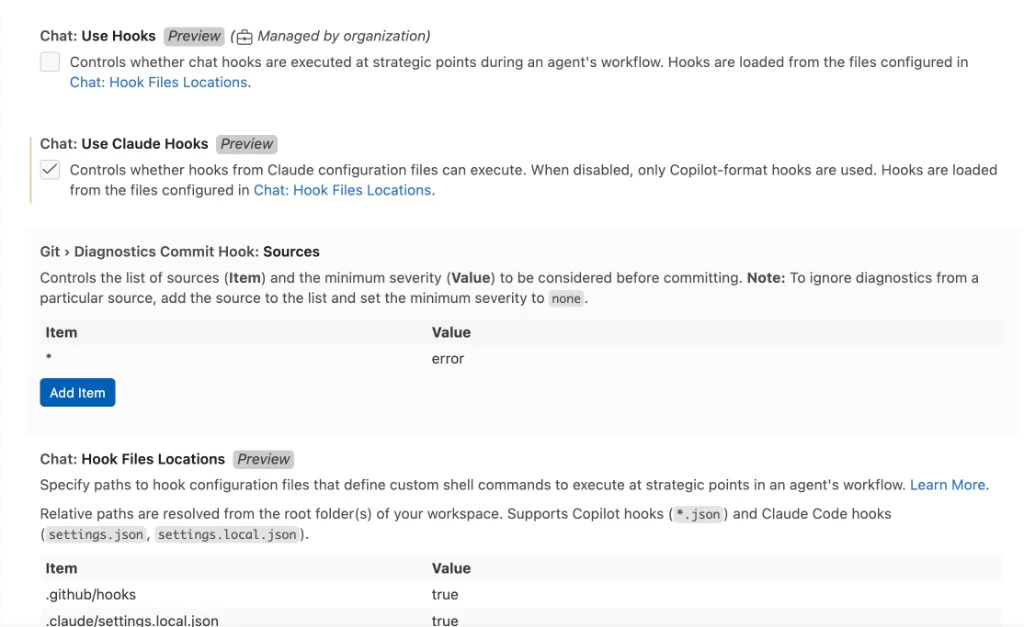
VS Code hooks are currently in preview, and theChat: Use Hooks setting may be disabled or managed by your organization. Use hooks only when you want extra lifecycle/tool detail or cross-agent coverage beyond Copilot’s OTel stream.
Before installing hooks, confirm Chat: Use Hooks is enabled in VS Code settings. If this setting is unchecked and marked as managed by your organization, VS Code will not execute .github/hooks/*.json hook files even if Asymptote installs them successfully.
Install project-level hooks
User-level hooks
harness.name=vscode. They can capture VS Code lifecycle events such as prompt submission, pre-tool and post-tool activity, stop events, and subagent start/stop where VS Code exposes those hook payloads. Because hooks are preview, behavior may vary across VS Code versions, organizations, and agent surfaces.
Discovery and status
Asymptote detects VS Code through thecode executable or the VS Code user settings directory. It checks whether Copilot Chat OTel is enabled, whether the exporter is otlp-http, and whether the endpoint points to Asymptote’s local OTLP HTTP receiver.
Use:
Use
Telemetry coverage
Deployment notes
For managed endpoint deployments, includevscode in the endpoint harness list when you want Asymptote to manage VS Code Copilot OTel settings:
For managed endpoint deployments, include vscode in the endpoint harness list when you want Asymptote to manage VS Code Copilot OTel settings
Related
Supported agent harnesses
Return to the runtime support overview.
Hooks
Install, inspect, and uninstall optional hook integrations.