Forwarding Overview

Beacon supports CrowdStrike Falcon HEC forwarding in two ways:
  • Collector forwarding sends OTLP events that pass through Beacon’s local collector directly to Falcon.
  • Vector runtime-log forwarding tails Beacon’s local runtime.jsonl file and forwards hook-written events to Falcon.
Use Vector runtime-log forwarding when Claude Code telemetry is produced by Beacon hooks, or when your organization manages Claude’s OTLP settings separately. Beacon still writes every normalized endpoint event to the active runtime JSONL log.

Runtime log paths

ModeRuntime log
User mode~/.beacon/endpoint/logs/runtime.jsonl
System mode/var/log/beacon-agent/runtime.jsonl
Use system mode for MDM deployments so every managed endpoint writes to /var/log/beacon-agent/runtime.jsonl while the collector forwards to Falcon LogScale.

Falcon LogScale data connection

Use CrowdStrike Falcon LogScale data onboarding to collect Beacon endpoint telemetry from local JSONL logs. Beacon writes one JSON object per line, so create a custom parser before creating the data connection.

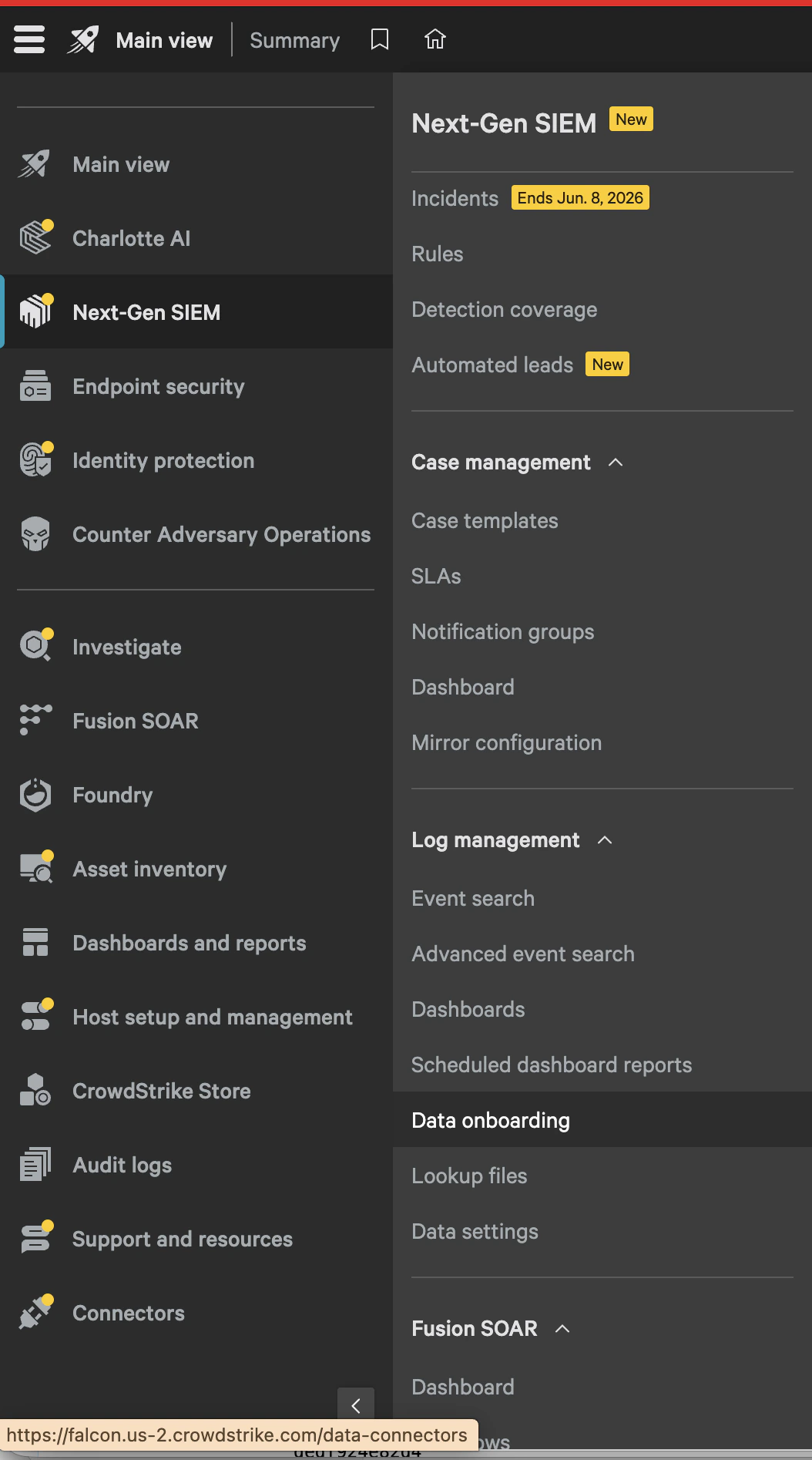
Open data onboarding

In CrowdStrike Falcon, go to Next-Gen SIEM > Log management > Data onboarding. CrowdStrike Falcon navigation showing Next-Gen SIEM data onboarding under Log management.
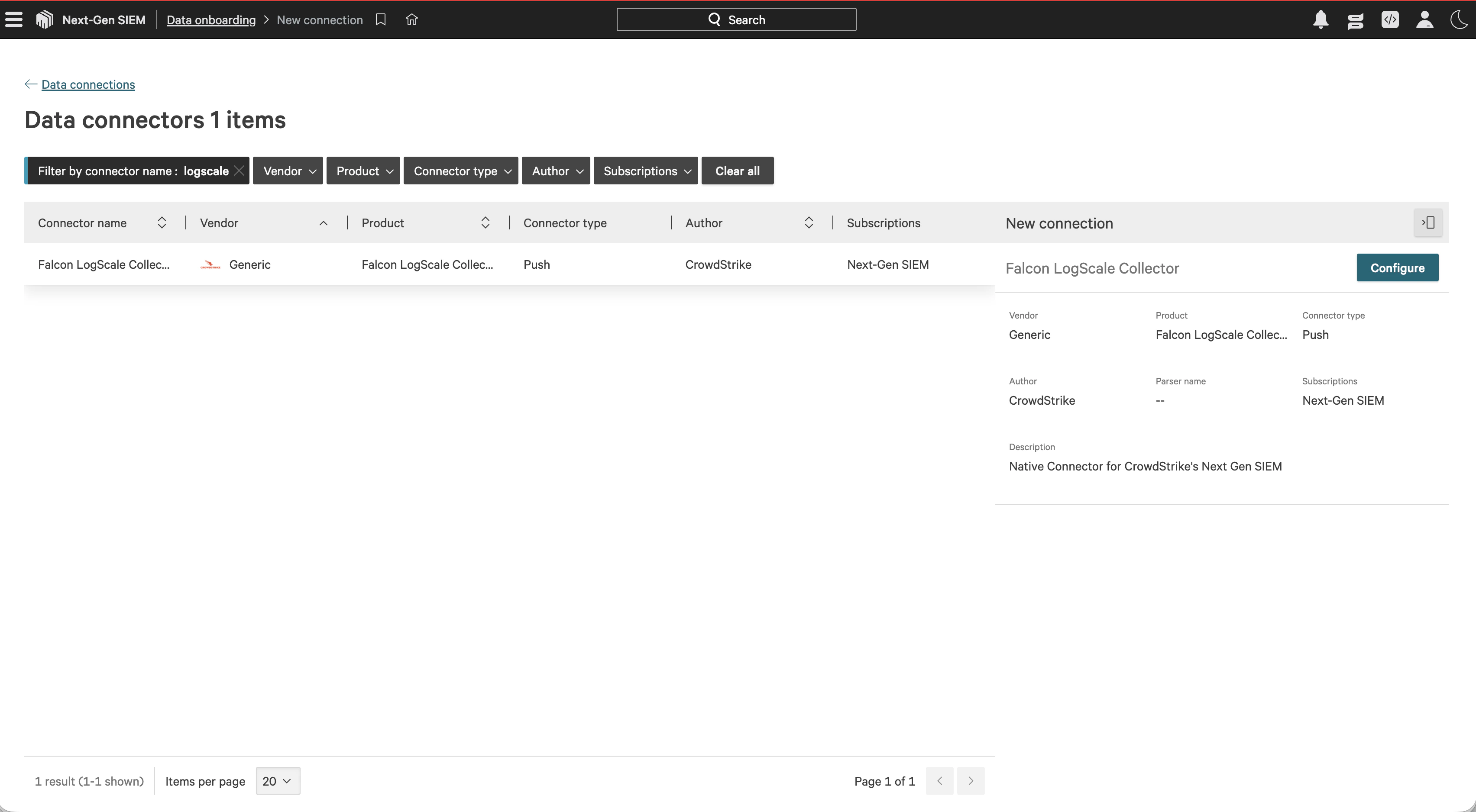
Select the Falcon LogScale Collector

Search for logscale, select Falcon LogScale Collector, then choose Configure. CrowdStrike data connectors page filtered to the Falcon LogScale Collector connector.
Create the Beacon parser

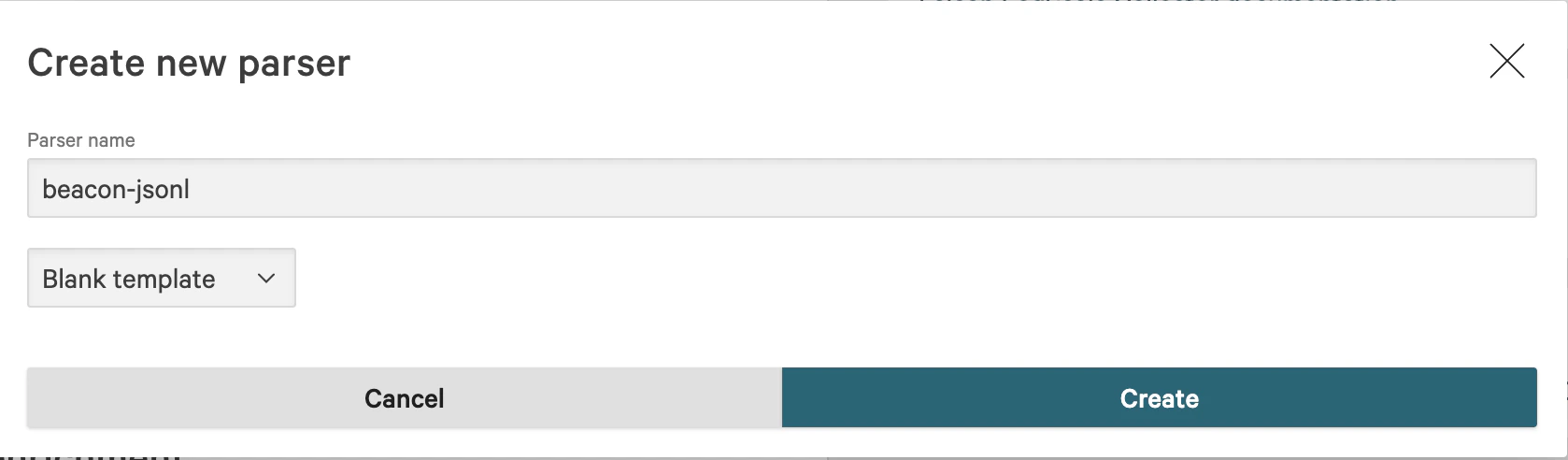
In Parsing and enrichment, select Create new parser. Name the parser beacon-jsonl, choose Blank template, and create the parser. CrowdStrike create new parser dialog with parser name beacon-jsonl and blank template selected. Paste this parser script:
/*
# Beacon Endpoint Agent JSONL Parser
Parses Beacon endpoint telemetry where each log line is one JSON object.
*/
| Vendor := "beacon"
| Parser.version := "1.0.0"
| ecs.version := "8.17.0"
| Cps.version := "2.0.0"
| event.module := "endpoint-agent"
| observer.type := "endpoint"
| parseJson(prefix="Vendor.", excludeEmpty="true", handleNull="discard")
| Vendor.timestamp := Vendor.timestamp
| parseTimestamp(field="Vendor.timestamp", format="yyyy-MM-dd'T'HH:mm:ss[.SSS]XXX", timezone="UTC")
| event.kind := "event"
| event.action := Vendor.event.action
| event.module := Vendor.product
| event.provider := Vendor.vendor
| event.dataset := "beacon.endpoint-agent"
| event.code := Vendor.schema_version
| array:append(array="event.category[]", values=[Vendor.event.category])
| array:append(array="event.type[]", values=["info"])
| observer.vendor := Vendor.vendor
| observer.product := Vendor.product
| observer.version := Vendor.endpoint.agent_version
| host.hostname := Vendor.endpoint.hostname
| host.os.type := Vendor.endpoint.os
| user.name := Vendor.user.name
| user.id := Vendor.user.uid
| process.command_line := Vendor.command.command
| process.name := Vendor.tool.name
| file.path := Vendor.file.path
| file.hash.sha256 := Vendor.file.diff_hash
| message := Vendor.message
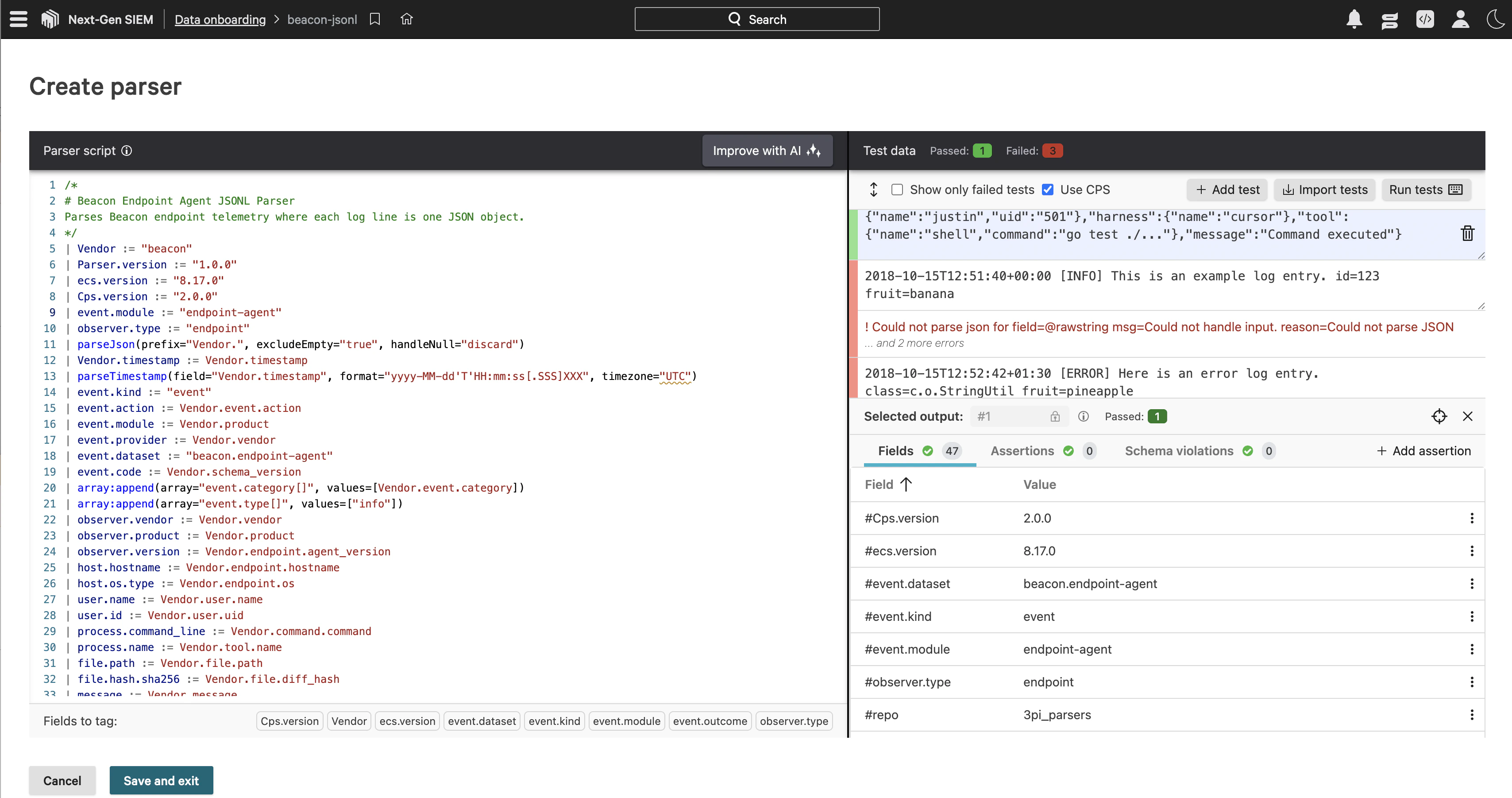
Use this sample event as parser test data:
{"timestamp":"2026-05-26T15:48:00Z","vendor":"beacon","product":"endpoint-agent","schema_version":"1.0","event":{"kind":"agent_runtime","action":"tool_use","category":"process"},"severity":"info","endpoint":{"hostname":"test-mac","os":"darwin","agent_version":"0.0.1"},"user":{"name":"justin","uid":"501"},"harness":{"name":"cursor"},"tool":{"name":"shell","command":"go test ./..."},"message":"Command executed"}
Run the parser test and confirm the parsed fields include event.dataset, event.action, host.hostname, user.name, process.name, and message. Events that include command.command also populate process.command_line. Save the parser when the sample event passes. CrowdStrike parser editor with the Beacon JSONL parser script and test data results.
Create the data connection

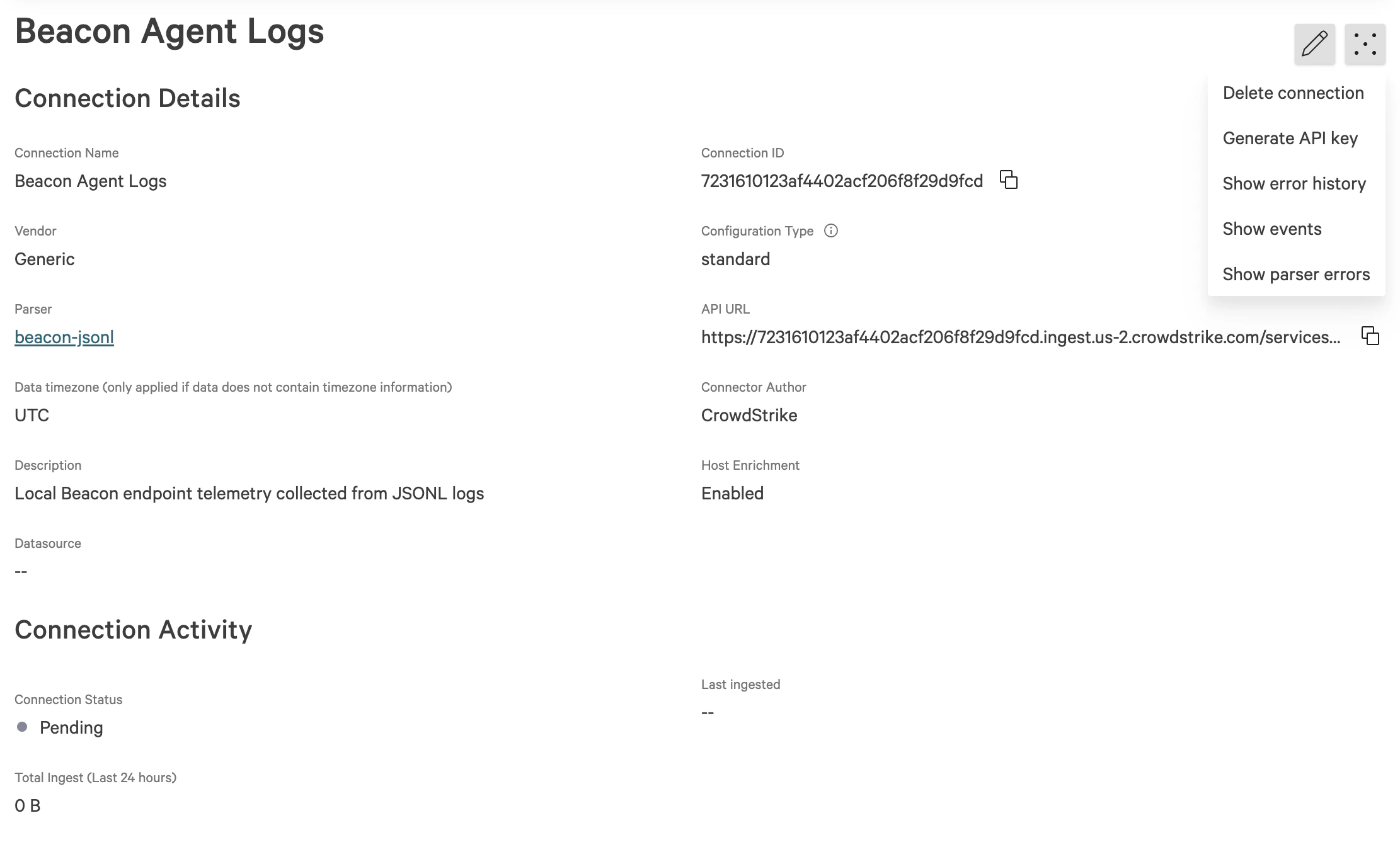
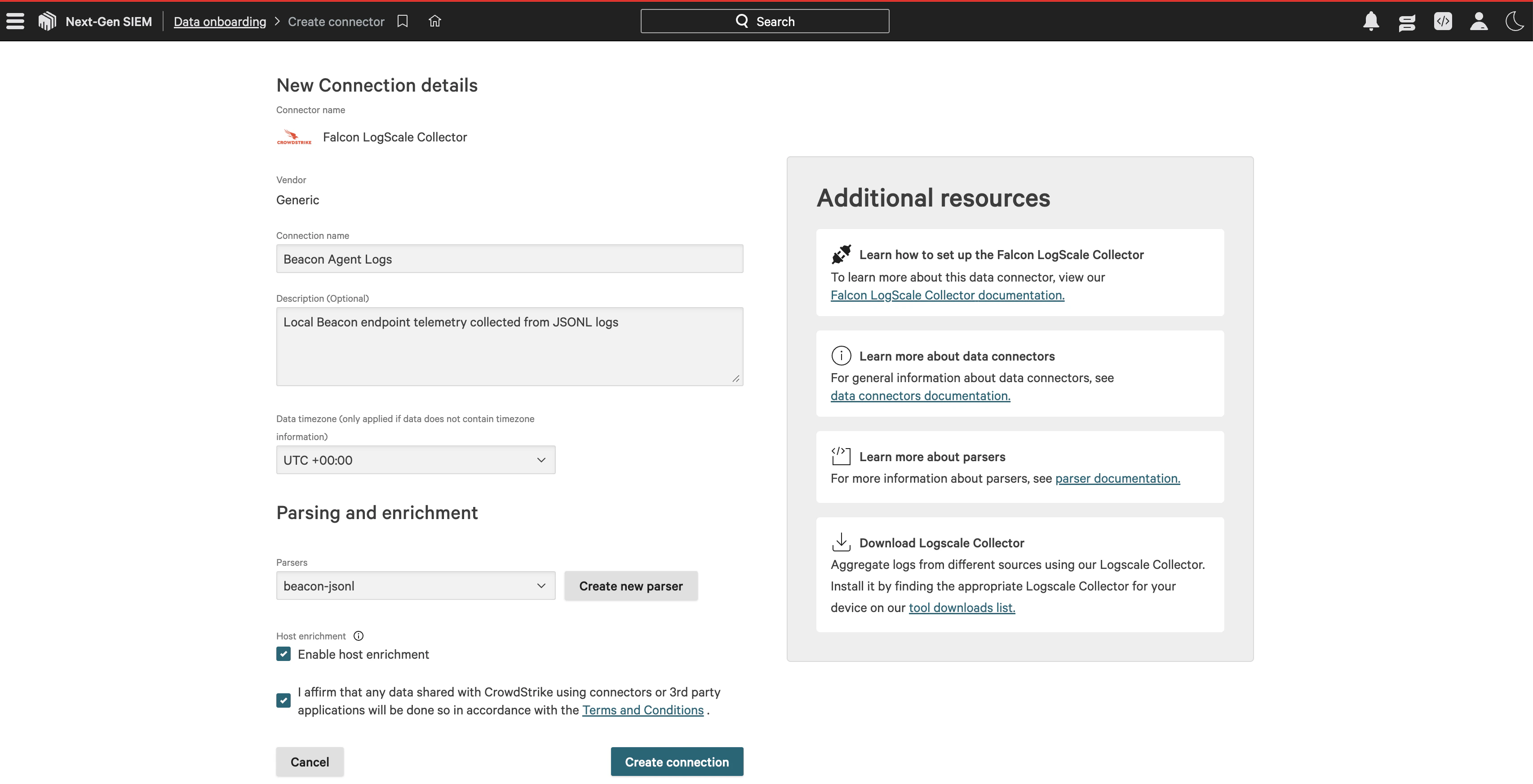
Return to the Falcon LogScale Collector connection details. Enter a connection name such as Beacon Agent Logs, add a description, select the beacon-jsonl parser, enable host enrichment if desired, accept the connector terms, and create the connection. CrowdStrike new connection details page with Beacon Agent Logs and the beacon-jsonl parser selected. After creating the connection, open the connection actions menu and select Generate API key. Save the generated API key with the connection API URL so your LogScale Collector can authenticate when forwarding Beacon events. CrowdStrike connection details page for Beacon Agent Logs showing the Generate API key action.
Run a smoke test

Run this local smoke test, replacing the token value with the API key generated for your data connection:
Run the local smoke test
export FALCON_HEC_TOKEN='PASTE_API_KEY_HERE'
curl -sS -X POST 'https://7231610123af4402acf206f8f29d9fcd.ingest.us-2.crowdstrike.com/services/collector' \
  -H "Authorization: Bearer ${FALCON_HEC_TOKEN}" \
  -H 'Content-Type: application/json' \
  -d '{"event":{"timestamp":"2026-05-26T16:02:00Z","vendor":"beacon","product":"endpoint-agent","schema_version":"1.0","event":{"kind":"agent_runtime","action":"tool_use","category":"process"},"severity":"info","endpoint":{"hostname":"test-mac","os":"darwin","agent_version":"0.0.1"},"user":{"name":"justin","uid":"501"},"harness":{"name":"cursor"},"tool":{"name":"shell","command":"crowdstrike ingest test"},"message":"Beacon CrowdStrike HEC smoke test"},"source":"beacon-endpoint-agent","sourcetype":"beacon-jsonl"}'
A working connection returns a success JSON response. Then search LogScale for the smoke-test message:
"Beacon CrowdStrike HEC smoke test"
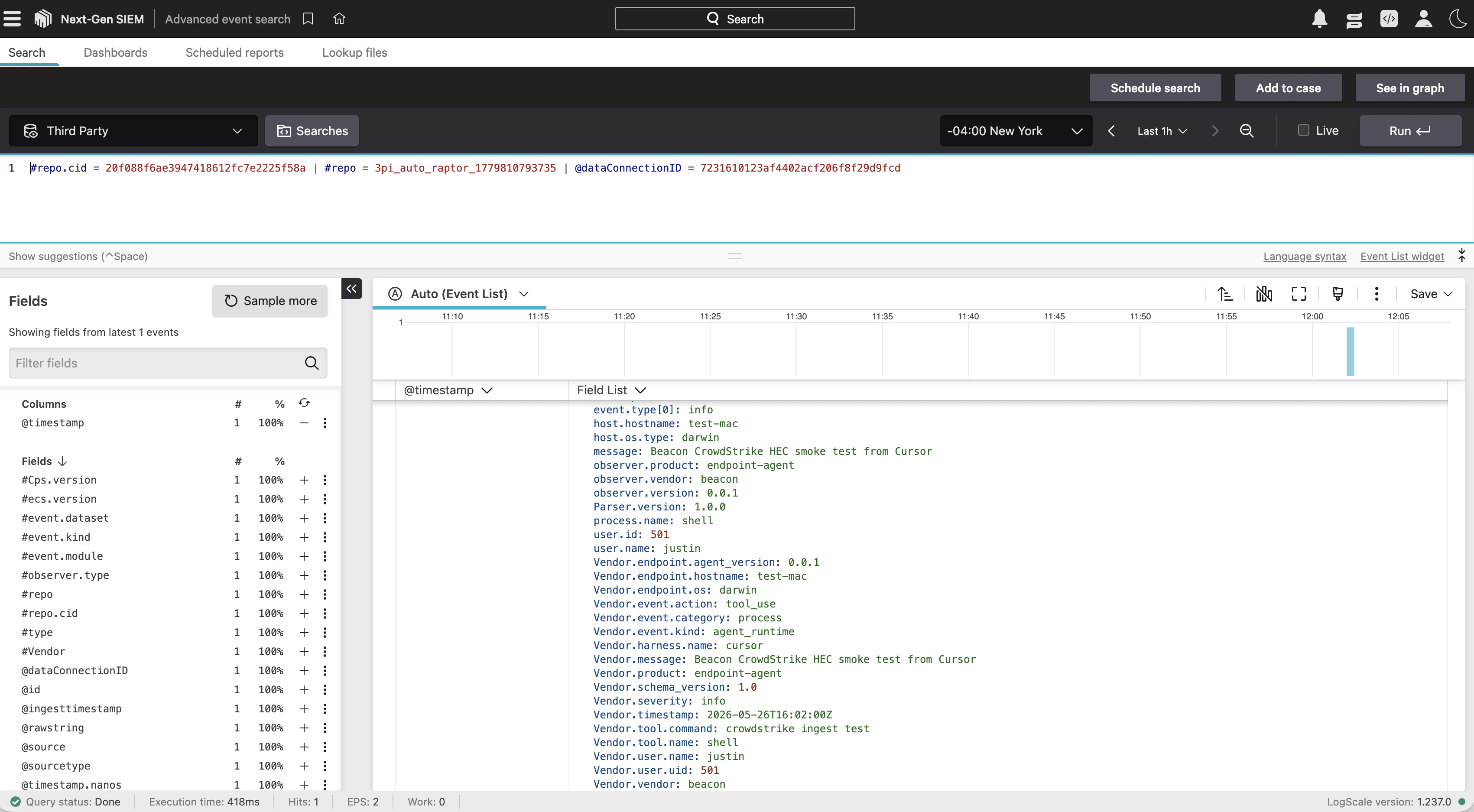
This is what the smoke-test event looks like in CrowdStrike: CrowdStrike Advanced event search showing a parsed Beacon endpoint smoke test event with normalized fields.

Choose a forwarding path

PathUse whenNotes
Collector forwardingClaude, Codex, or another runtime sends OTLP to Beacon’s local collectorConfigure Falcon HEC on beacon endpoint install or repair.
Vector runtime-log forwardingClaude hook events are written directly to runtime.jsonlDeploy the Beacon macOS package with Vector bundled, then run the Falcon Vector forwarder script.

Collector forwarding

Pass Falcon HEC settings during endpoint install:
Pass Falcon HEC settings during endpoint install
sudo /opt/beacon/bin/beacon endpoint install \
  --system \
  --falcon-hec-endpoint https://cloud.<region>.humio.com/api/v1/ingest/hec \
  --falcon-hec-token "$FALCON_HEC_TOKEN" \
  --falcon-index beacon \
  --falcon-source beacon-endpoint-agent
To add or update Falcon HEC on an existing endpoint, run repair with the same destination flags:
Update Falcon HEC on an existing endpoint
sudo /opt/beacon/bin/beacon endpoint repair \
  --system \
  --falcon-hec-endpoint https://cloud.<region>.humio.com/api/v1/ingest/hec \
  --falcon-hec-token "$FALCON_HEC_TOKEN" \
  --falcon-index beacon

Settings

SettingRecommendation
EndpointFalcon LogScale HEC ingest endpoint URL
TokenFalcon LogScale ingest token from your LogScale administrator
RepositoryOptional repository for multi-repository tokens, passed with --falcon-index
SourceOptional source value. Defaults to beacon-endpoint-agent
Parser or sourcetypeOptional parser or sourcetype value. Defaults to json
TLSUse normal certificate validation. Reserve --falcon-insecure-skip-verify for private test endpoints
If your Falcon LogScale endpoint uses a private CA, pass the CA bundle with --falcon-ca-file /path/to/ca.pem.

Collector behavior

When Falcon HEC is configured, Beacon writes a collector pipeline with both exporters enabled:
exporters: [beaconjson, falcon_hec]
The beaconjson exporter preserves the local runtime log. The falcon_hec exporter sends Beacon-normalized OTLP logs, traces, and metrics to Falcon LogScale as newline-delimited HEC events. Each HEC payload wraps the normalized Beacon event object, includes an @timestamp, and uses the configured token, source, sourcetype, and repository.

Vector runtime-log forwarding

Beacon v0.0.49 adds a managed Vector path for hook-only deployments. This is the recommended path when Claude Code hooks write events to runtime.jsonl but the Beacon collector is not the source of those events. The data flow is:
Claude hooks -> runtime.jsonl -> Vector -> CrowdStrike Falcon HEC

Package requirement

Use the Beacon macOS package that includes Vector. Homebrew updates the beacon CLI, but it does not install /opt/beacon/bin/vector or the Jamf helper scripts. The package installs:
/opt/beacon/bin/vector
/opt/beacon/jamf/scripts/install-falcon-vector-forwarder.sh
/opt/beacon/jamf/scripts/repair-falcon-claude-hooks-vector.sh
/opt/beacon/scripts/run-falcon-forwarder.sh

Manual setup without Jamf

To simulate the Jamf setup on one Mac, install the Beacon package, then run the packaged helper manually. Jamf reserves script arguments 1-3, so pass _ _ _ before the custom parameters:
Simulate the Jamf setup on one Mac
export FALCON_HEC_ENDPOINT="https://<tenant>.ingest.<region>.crowdstrike.com/services/collector"
export FALCON_HEC_TOKEN="PASTE_TOKEN_HERE"

sudo /opt/beacon/jamf/scripts/repair-falcon-claude-hooks-vector.sh \
  _ _ _ \
  "$FALCON_HEC_ENDPOINT" \
  "$FALCON_HEC_TOKEN" \
  "beacon-endpoint-agent" \
  "json"
The script:
  • prepares /var/log/beacon-agent/runtime.jsonl,
  • installs Claude Code hooks for the logged-in console user,
  • creates /Library/Application Support/Beacon/Forwarders/falcon-vector.toml,
  • stores the token in /Library/Application Support/Beacon/Forwarders/falcon-vector.env,
  • starts com.beacon.endpoint.falcon-forwarder.

Jamf parameters

Use repair-falcon-claude-hooks-vector.sh when one policy should repair Beacon, install Claude hooks, and start the Vector forwarder.
ParameterValue
4Falcon HEC endpoint
5Falcon HEC token
6Source, default beacon-endpoint-agent
7Sourcetype/parser, default json
8OTLP gRPC port, default 4317
9OTLP HTTP port, default 4318
10Optional repository/index
For a forwarder-only policy, use install-falcon-vector-forwarder.sh with the same endpoint and token.

Validate hook-only forwarding

Confirm Vector is running:
Confirm Vector is running
sudo launchctl print system/com.beacon.endpoint.falcon-forwarder
tail -n 50 /tmp/com.beacon.endpoint.falcon-forwarder.err
Generate a unique Claude prompt and confirm it appears locally:
Generate a unique Claude prompt and confirm it appears locally
MARKER="beacon falcon hook test $(date +%s)"
claude -p "$MARKER"
sudo grep "$MARKER" /var/log/beacon-agent/runtime.jsonl
Search Falcon for the same marker:
source = "beacon-endpoint-agent" "beacon falcon hook test"

Validate forwarding

Confirm Beacon has the destination configured:
Confirm Beacon has the destination configured
sudo /opt/beacon/bin/beacon endpoint status --system --json
In the JSON output, check that destinations.falcon_hec.configured is true and that the endpoint, repository, source, and sourcetype match your deployment. The token is not printed. Then write a validation event:
Write a validation event
sudo /opt/beacon/bin/beacon endpoint falcon validate --system
Search Falcon LogScale for the validation event and normalized Beacon fields:
source = "beacon-endpoint-agent" "Beacon endpoint Falcon validation event"
vendor = "beacon" product = "endpoint-agent"
If events do not appear, verify that the collector service is running, the Falcon HEC endpoint accepts the configured token, the repository name matches the token scope, and TLS settings match your LogScale deployment.
Check endpoint status as JSON
sudo /opt/beacon/bin/beacon endpoint status --system --json
sudo launchctl print system/com.beacon.endpoint.collector

Content Handling

Beacon applies redaction, sanitization, truncation, and event-size limits before events are written locally or forwarded through Falcon HEC. Review repository access, parser behavior, retention, and downstream consumers so retained telemetry matches your approved collection policy.

Log forwarding

Review forwarding patterns and validation steps.

Endpoint install

Configure Falcon HEC forwarding during endpoint install.

Endpoint repair

Add or update Falcon HEC forwarding on an existing endpoint.

Endpoint event schema

Review normalized Beacon JSONL fields and example events.