

Forwarding Overview
Beaconv0.0.11 added an Elastic content pack for teams that want to search Beacon endpoint events in Elasticsearch and Kibana. Current Beacon releases write one local source of truth, the active runtime JSONL log, and keep that handoff path bounded with local rotation. Filebeat or standalone Elastic Agent reads that file and owns the Elastic hosts, API keys, usernames, and passwords.
Use this path when you want Beacon events in Elastic Cloud, a self-managed Elastic deployment, or a local Kibana validation stack without giving Beacon itself cluster credentials.
How forwarding works
Beacon writes endpoint telemetry to one local JSONL file. Filebeat or standalone Elastic Agent tails that file, parses each line as JSON, and forwards the events to Elasticsearch. The generated Elastic assets install the index lifecycle policy, templates, ingest pipeline, and starter Kibana objects used to normalize Beacon events into ECS-adjacent fields and searchablebeacon.* fields.
Beacon never stores Elastic cluster URLs, API keys, usernames, passwords, or TLS settings. Keep those values in Filebeat, Elastic Agent, or your endpoint-management secret store.
Runtime log paths
| Mode | Runtime log |
|---|---|
| User mode | ~/.beacon/endpoint/logs/runtime.jsonl |
| System mode | /var/log/beacon-agent/runtime.jsonl |
/var/log/beacon-agent/runtime.jsonl.
Local Elastic stack
For a local macOS trial, install Beacon, configure endpoint telemetry, and start the bundled loopback-only stack:Start the local Elastic validation stack
| Service | URL |
|---|---|
| Elasticsearch | http://localhost:9200 |
| Kibana | http://localhost:5601 |
install-pack writes the Filebeat config, Elasticsearch assets, Kibana starter assets, sample event, and Docker Compose file. elastic up then uses that pack directory to start the local stack.

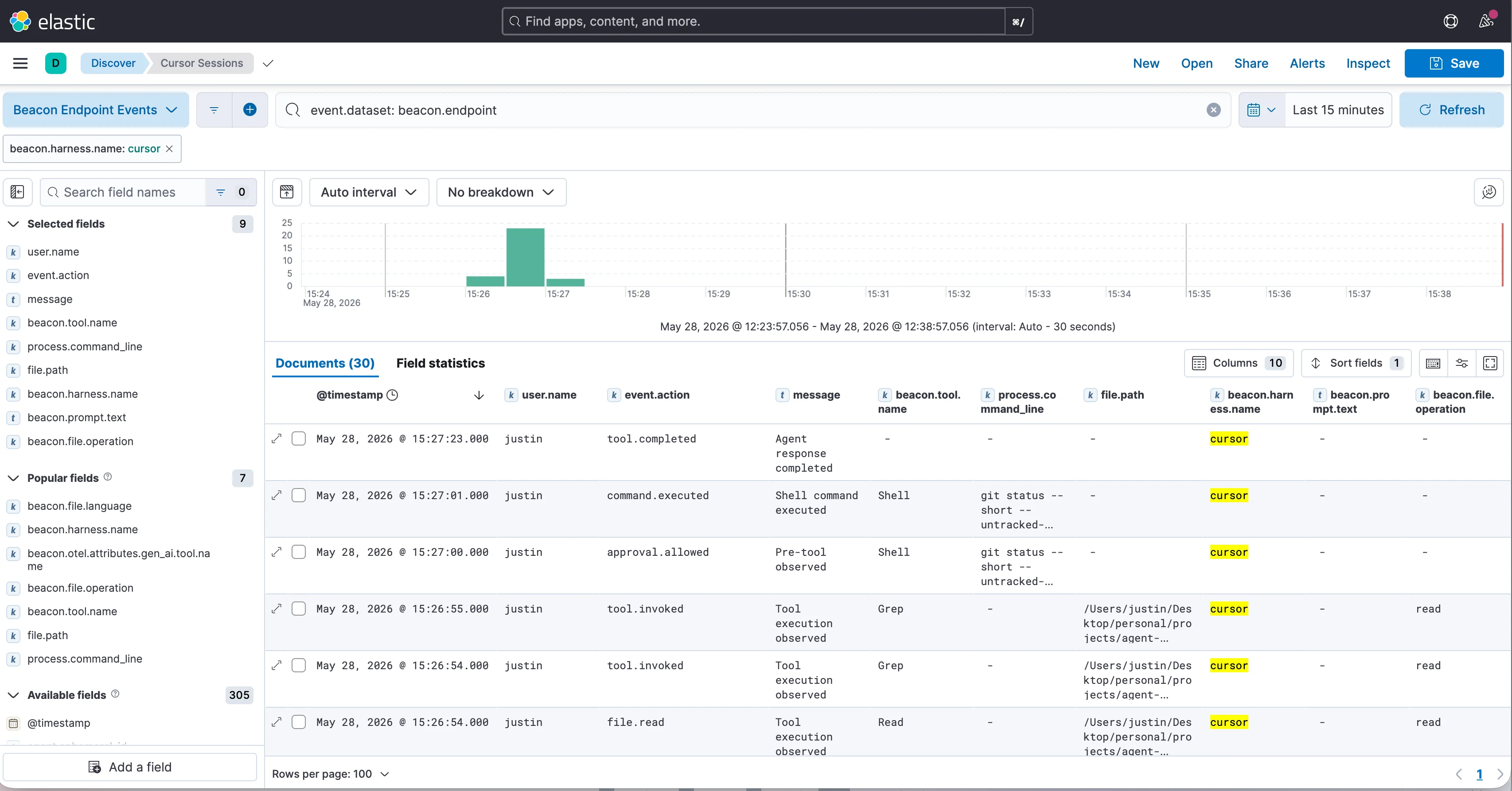
Beacon Endpoint Events data view, and use Discover to verify events. If ports are already in use, set BEACON_ELASTIC_ES_PORT or BEACON_ELASTIC_KIBANA_PORT before running elastic up.
Stop the local stack with
beacon endpoint elastic up and beacon endpoint elastic down are local validation helpers for macOS with Docker Desktop. For Linux endpoints or production deployments, use the generated Filebeat or standalone Elastic Agent configuration with your normal service manager.Elastic Cloud or self-managed Elastic
Generate the content pack on the endpoint or in your endpoint management workflow:Generate the content pack on the endpoint or in your endpoint management workflow
filebeat.ymlfor Filebeat filestream input over Beacon JSONLelastic-agent-standalone.ymlfor standalone Elastic Agent- Elasticsearch ILM, component template, index template, and ingest pipeline JSON
- Starter Kibana saved objects
- A sample Beacon event for ingest pipeline simulation
- A Docker Compose file for local validation
Install the Elasticsearch assets before shipping events
kibana-assets.ndjson through Kibana Stack Management or the saved objects import API.
Then run Filebeat with your Elastic endpoint and one authentication method:
Run Filebeat with your Elastic endpoint
ES_HOSTS can be an internal Elasticsearch URL such as https://elasticsearch.example:9200. If you use username/password auth, uncomment username and password in the generated config and provide ES_USERNAME and ES_PASSWORD.
To use standalone Elastic Agent instead of Filebeat, apply the same ES_HOSTS and authentication environment variables to elastic-agent-standalone.yml and run Elastic Agent in standalone mode.
Required Elastic privileges
Use the least-privilege API key or role your Elastic administrator approves. Filebeat needs clustermonitor plus auto_configure, create_doc, and view_index_metadata on logs-beacon.endpoint-*.
The setup user or API key also needs permission to install ILM policies, component templates, index templates, ingest pipelines, and Kibana saved objects. You can use a separate higher-privilege setup credential for asset installation and a lower-privilege shipping credential for Filebeat or Elastic Agent.
Validate forwarding
Confirm the Beacon runtime log exists and has recent endpoint events:Confirm the Beacon runtime log exists and has recent endpoint events
Simulate the ingest pipeline with the generated sample event
Authorization header.
After Filebeat or Elastic Agent starts, search Kibana Discover with the Beacon Endpoint Events data view or query the index pattern. Beacon fields are mapped under beacon.* by the ingest pipeline:
Search for Beacon events
filebeat.yml or elastic-agent-standalone.yml points at the same runtime log path Beacon is writing, that the shipper service can read that file, and that ES_HOSTS, ES_API_KEY, TLS verification, and any custom CA settings match your Elastic deployment.
Related
beacon endpoint elastic
Review Elastic command syntax, flags, and examples.
Log forwarding
Review forwarding patterns across Wazuh, Splunk HEC, Falcon LogScale, Elastic, and other SIEMs.
Endpoint event schema
Review normalized Beacon JSONL fields and example events.
Agent harness integrations
Review supported agent harnesses, deployment modes, storage, and forwarding.