> ## Documentation Index
> Fetch the complete documentation index at: https://docs.asymptotelabs.ai/llms.txt
> Use this file to discover all available pages before exploring further.
# Datadog
> Forward Beacon endpoint events into Datadog Logs with Datadog Agent custom log collection.
## Forwarding Overview
Beacon streams endpoint events to Datadog by writing local JSONL and letting the Datadog Agent tail that file. Beacon does not store Datadog API keys or site configuration.
Use this guide for a first-time macOS setup with Datadog Logs. You can complete the setup entirely from the command line; the Datadog UI steps below are optional and are included to show where the same values appear in the Datadog onboarding flow.
## What You Need
* Beacon CLI installed.
* Datadog Agent installed and connected to your Datadog organization.
* Permission to edit `/opt/datadog-agent/etc/datadog.yaml` and restart the Datadog Agent.
## Choose User Or System Mode
| Setup | Beacon commands | Runtime log |
| ----------------------- | --------------------------------------------------- | --------------------------------------- |
| Local user testing | `beacon endpoint ...` | `~/.beacon/endpoint/logs/runtime.jsonl` |
| MDM or managed endpoint | `sudo /opt/beacon/bin/beacon endpoint ... --system` | `/var/log/beacon-agent/runtime.jsonl` |
For production or MDM deployment, prefer **system mode**. It avoids per-user home-directory permissions because the Datadog Agent can tail `/var/log/beacon-agent/runtime.jsonl`.
## 1. Install Beacon And Confirm Logs
For local testing:
```bash title="Set up local testing" theme={null}
brew tap asymptote-labs/tap
brew install beacon
beacon endpoint install
beacon endpoint status
ls -l ~/.beacon/endpoint/logs/runtime.jsonl
```
For system mode:
```bash title="Use system mode" theme={null}
sudo /opt/beacon/bin/beacon endpoint install --system
sudo /opt/beacon/bin/beacon endpoint status --system
sudo ls -l /var/log/beacon-agent/runtime.jsonl
```
 ## 2. Enable Datadog Log Collection
Open the Datadog Agent config:
```bash title="Open the Datadog Agent config" theme={null}
sudo nano /opt/datadog-agent/etc/datadog.yaml
```
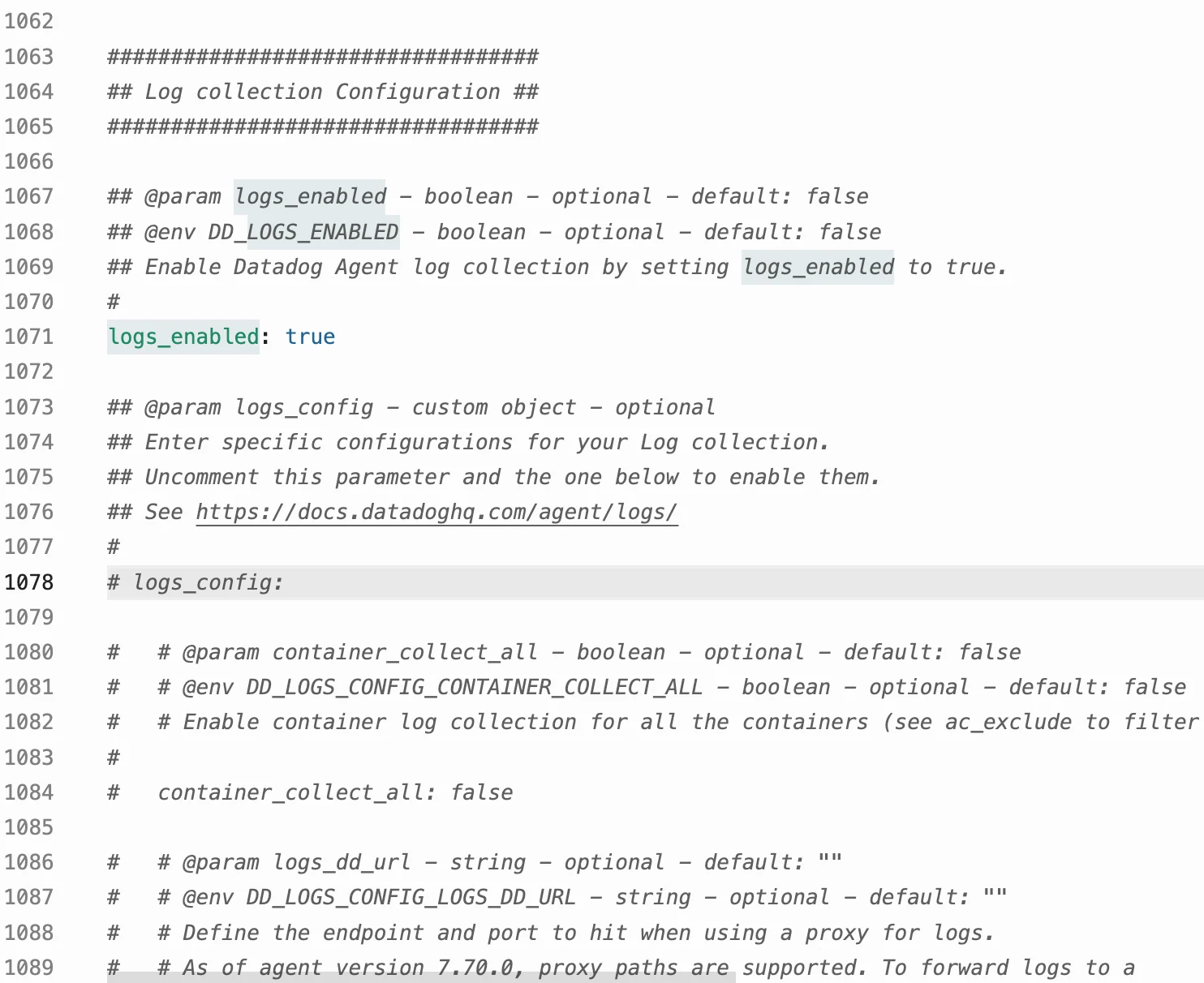
Set:
```yaml theme={null}
logs_enabled: true
```
You do not need to configure Datadog's OpenTelemetry Agent for this setup. Beacon v0 uses Datadog Agent custom file log collection on macOS.
## 2. Enable Datadog Log Collection
Open the Datadog Agent config:
```bash title="Open the Datadog Agent config" theme={null}
sudo nano /opt/datadog-agent/etc/datadog.yaml
```
Set:
```yaml theme={null}
logs_enabled: true
```
You do not need to configure Datadog's OpenTelemetry Agent for this setup. Beacon v0 uses Datadog Agent custom file log collection on macOS.
 ## 3. Optional: Review Custom File Logs In Datadog
This step is optional. Beacon generates the Datadog Agent config in the next step, so you do not need to copy anything manually from the Datadog UI.
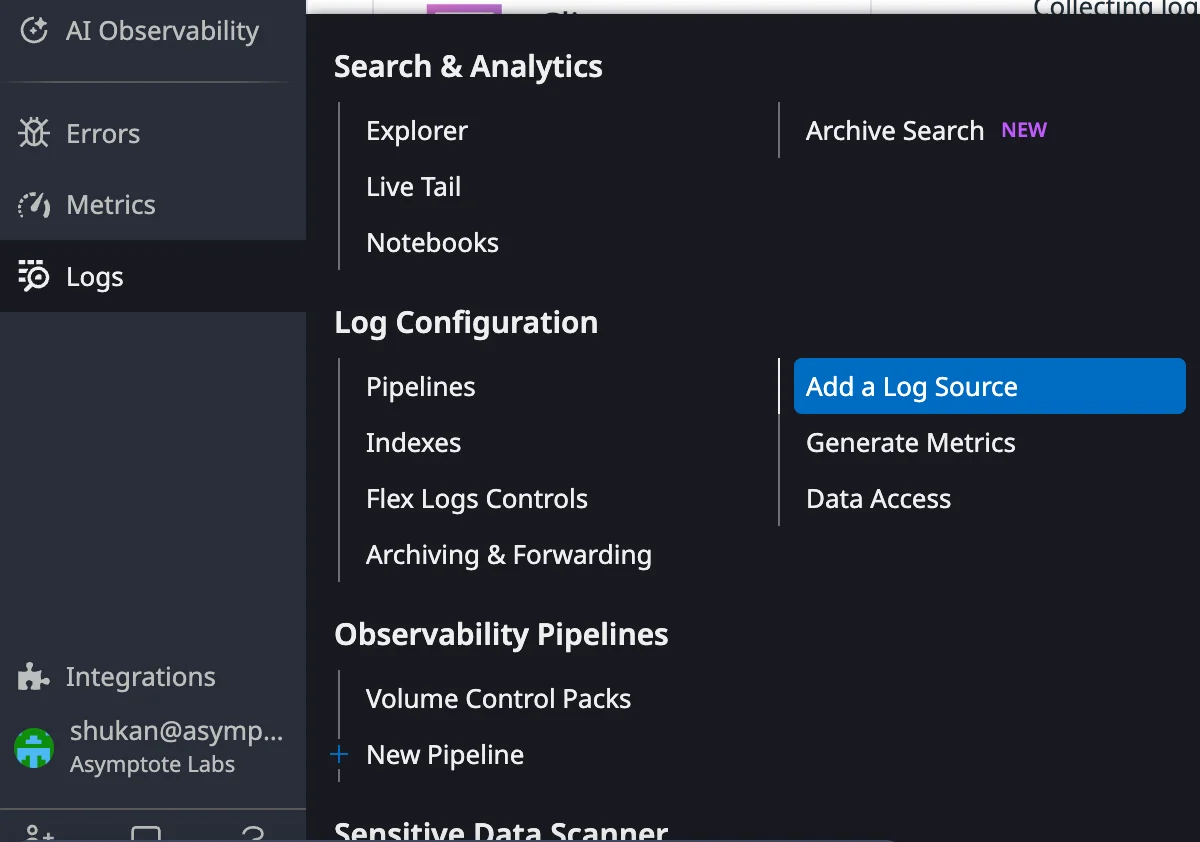
If you want to see where the values come from in Datadog, open **Logs** > **Add a Log Source**.
## 3. Optional: Review Custom File Logs In Datadog
This step is optional. Beacon generates the Datadog Agent config in the next step, so you do not need to copy anything manually from the Datadog UI.
If you want to see where the values come from in Datadog, open **Logs** > **Add a Log Source**.
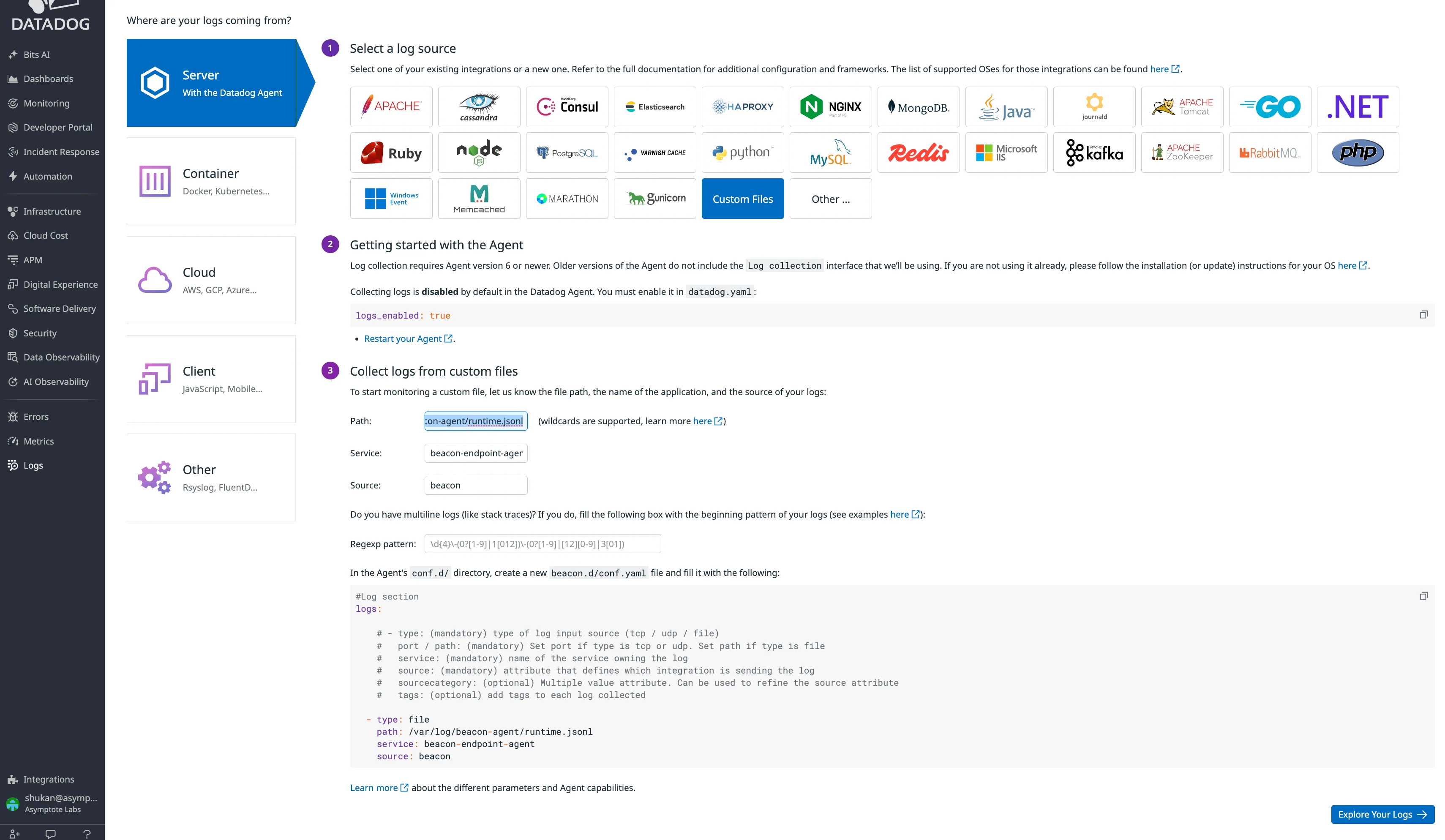
 Choose **Server** > **Custom Files**.
Fill the form with:
| Field | Local user testing | System / MDM |
| ------- | --------------------------------------------------- | ------------------------------------- |
| Path | `/Users//.beacon/endpoint/logs/runtime.jsonl` | `/var/log/beacon-agent/runtime.jsonl` |
| Service | `beacon-endpoint-agent` | `beacon-endpoint-agent` |
| Source | `beacon` | `beacon` |
Leave multiline parsing blank. Beacon writes one JSON event per line.
Choose **Server** > **Custom Files**.
Fill the form with:
| Field | Local user testing | System / MDM |
| ------- | --------------------------------------------------- | ------------------------------------- |
| Path | `/Users//.beacon/endpoint/logs/runtime.jsonl` | `/var/log/beacon-agent/runtime.jsonl` |
| Service | `beacon-endpoint-agent` | `beacon-endpoint-agent` |
| Source | `beacon` | `beacon` |
Leave multiline parsing blank. Beacon writes one JSON event per line.
 ## 4. Generate And Install The Beacon Config
Generate Beacon's Datadog content pack:
```bash title="Generate Beacon's Datadog content pack" theme={null}
beacon endpoint datadog install-pack --output ./beacon-datadog-pack
```
For system mode:
```bash title="Use system mode" theme={null}
sudo /opt/beacon/bin/beacon endpoint datadog install-pack --system --output ./beacon-datadog-pack
```
## 4. Generate And Install The Beacon Config
Generate Beacon's Datadog content pack:
```bash title="Generate Beacon's Datadog content pack" theme={null}
beacon endpoint datadog install-pack --output ./beacon-datadog-pack
```
For system mode:
```bash title="Use system mode" theme={null}
sudo /opt/beacon/bin/beacon endpoint datadog install-pack --system --output ./beacon-datadog-pack
```
 Install the generated Datadog Agent config and restart the Agent:
```bash title="Install the generated Datadog Agent config and restart the Agent" theme={null}
sudo mkdir -p /opt/datadog-agent/etc/conf.d/beacon.d
sudo cp ./beacon-datadog-pack/conf.yaml /opt/datadog-agent/etc/conf.d/beacon.d/conf.yaml
sudo chmod 0644 /opt/datadog-agent/etc/conf.d/beacon.d/conf.yaml
sudo launchctl kickstart -k system/com.datadoghq.agent
```
## 5. Validate End To End
Write a test event:
```bash title="Write a test event" theme={null}
beacon endpoint datadog validate
```
For system mode:
```bash title="Use system mode" theme={null}
sudo /opt/beacon/bin/beacon endpoint datadog validate --system
```
Install the generated Datadog Agent config and restart the Agent:
```bash title="Install the generated Datadog Agent config and restart the Agent" theme={null}
sudo mkdir -p /opt/datadog-agent/etc/conf.d/beacon.d
sudo cp ./beacon-datadog-pack/conf.yaml /opt/datadog-agent/etc/conf.d/beacon.d/conf.yaml
sudo chmod 0644 /opt/datadog-agent/etc/conf.d/beacon.d/conf.yaml
sudo launchctl kickstart -k system/com.datadoghq.agent
```
## 5. Validate End To End
Write a test event:
```bash title="Write a test event" theme={null}
beacon endpoint datadog validate
```
For system mode:
```bash title="Use system mode" theme={null}
sudo /opt/beacon/bin/beacon endpoint datadog validate --system
```
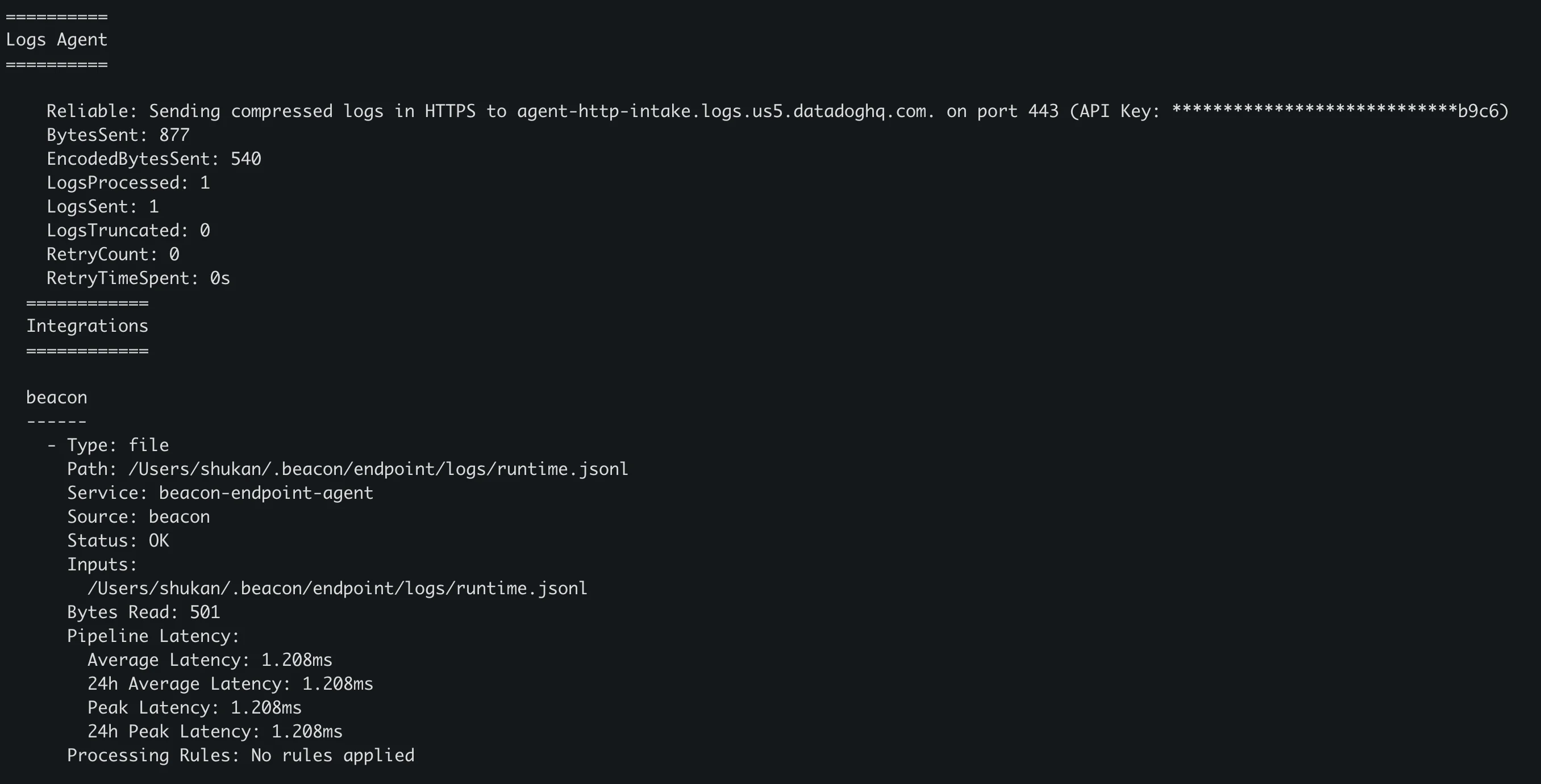
 Check Datadog Agent status:
```bash title="Check Datadog Agent status" theme={null}
sudo datadog-agent status
```
Look for:
* `beacon`
* `Status: OK`
* `Service: beacon-endpoint-agent`
* `Source: beacon`
* `LogsProcessed` and `LogsSent` greater than zero
Check Datadog Agent status:
```bash title="Check Datadog Agent status" theme={null}
sudo datadog-agent status
```
Look for:
* `beacon`
* `Status: OK`
* `Service: beacon-endpoint-agent`
* `Source: beacon`
* `LogsProcessed` and `LogsSent` greater than zero
 ## 6. Search In Datadog
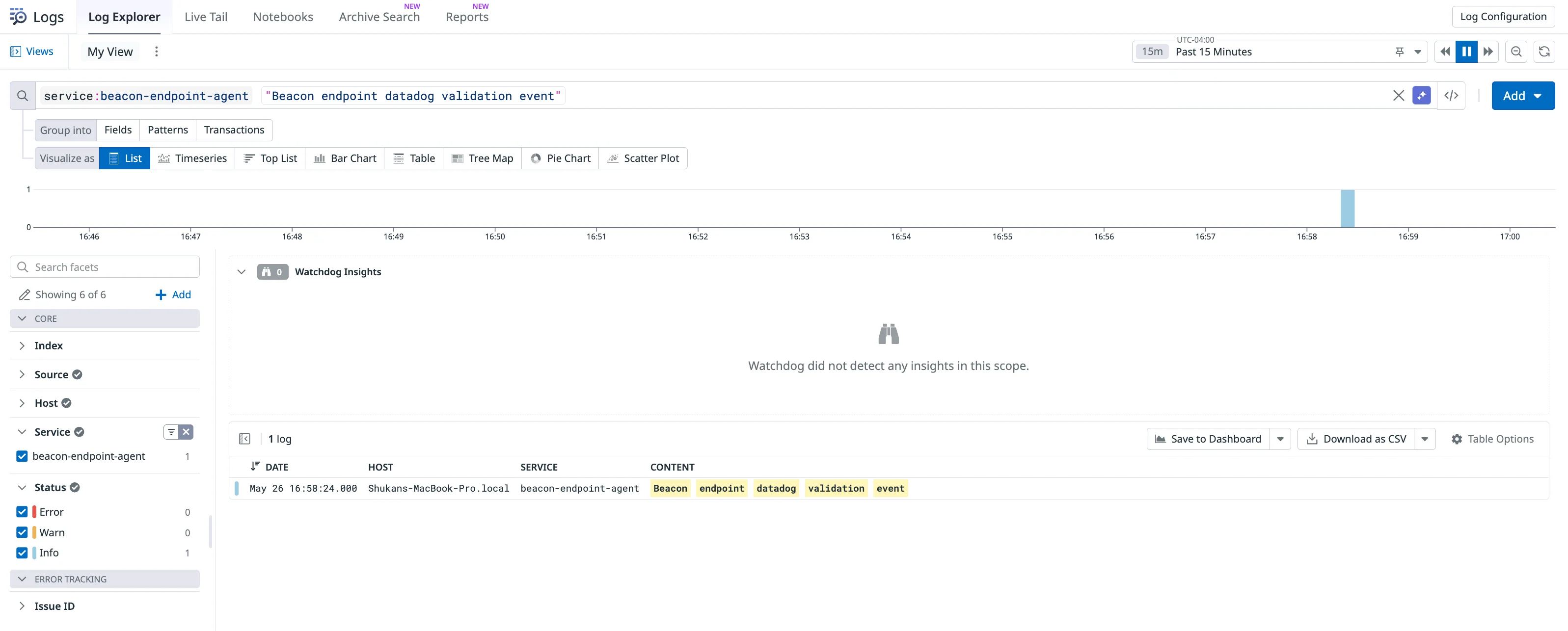
In Datadog Log Explorer, search for:
```text theme={null}
service:beacon-endpoint-agent
```
To find the validation event:
```text theme={null}
service:beacon-endpoint-agent "Beacon endpoint datadog validation event"
```
## 6. Search In Datadog
In Datadog Log Explorer, search for:
```text theme={null}
service:beacon-endpoint-agent
```
To find the validation event:
```text theme={null}
service:beacon-endpoint-agent "Beacon endpoint datadog validation event"
```
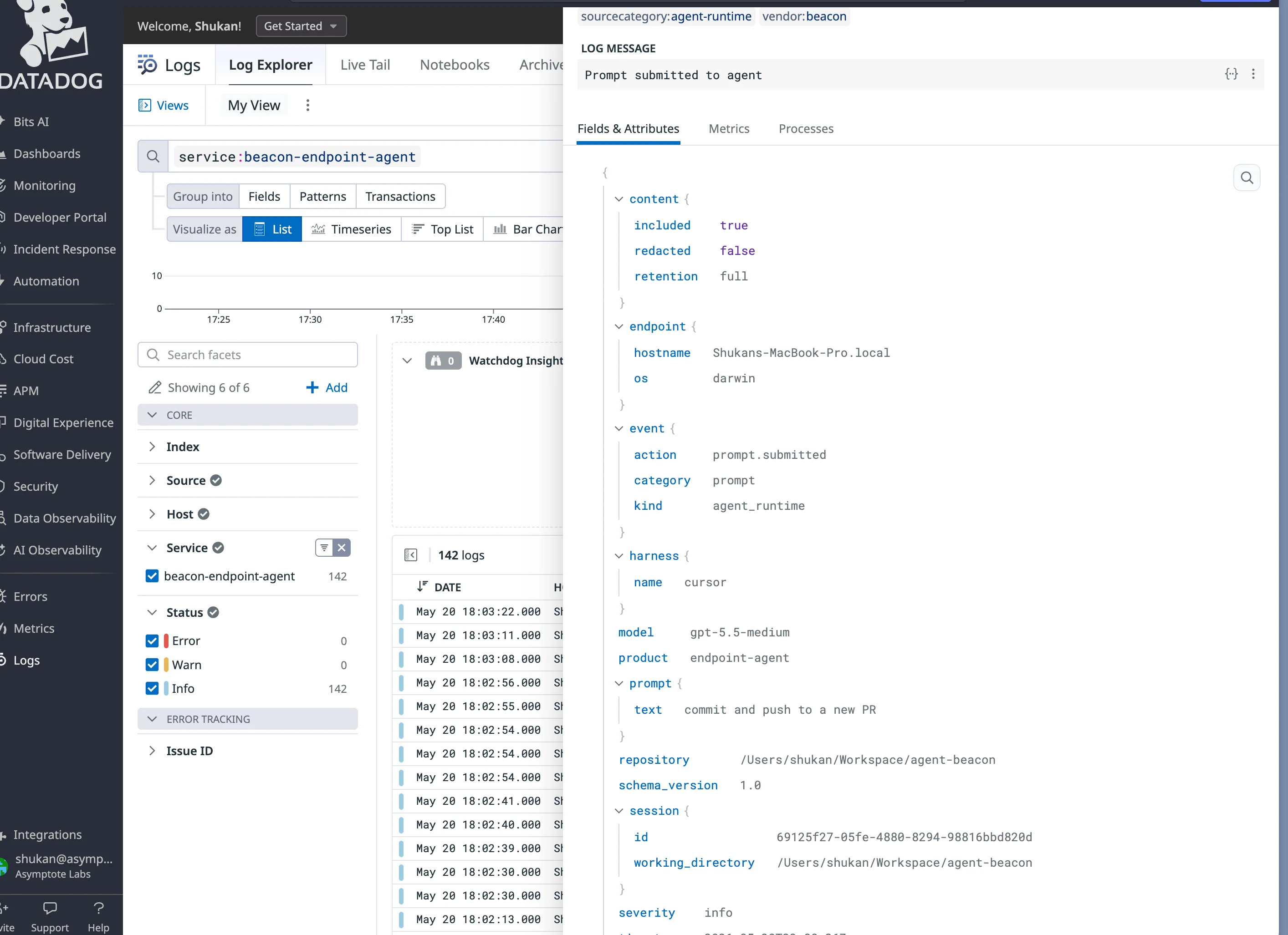
 When everything is wired up, Beacon events appear under `service:beacon-endpoint-agent`. Expanding a log shows the normalized Beacon fields such as `event.action`, `harness.name`, `prompt.text`, `content.retention`, `repository`, and `session`.
 ## Troubleshooting
If Datadog status shows `permission denied`, the Agent cannot read the runtime log. The Datadog Agent usually runs as `_dd-agent`.
For local user testing, either grant `_dd-agent` access to the user-mode log path or use system mode instead. For MDM deployment, use system mode so the Agent tails `/var/log/beacon-agent/runtime.jsonl`.
If Log Explorer is empty:
* Confirm `logs_enabled: true`.
* Confirm `/opt/datadog-agent/etc/conf.d/beacon.d/conf.yaml` exists.
* Restart the Agent.
* Run `beacon endpoint datadog validate` again.
* Check `sudo datadog-agent status`.
## Content Handling
Beacon applies redaction, sanitization, truncation, and event-size limits before events are written to `runtime.jsonl` and tailed by Datadog Agent. Review log access, indexes, retention, and downstream consumers so retained telemetry matches your approved collection policy.
## OpenTelemetry Note
Datadog's DDOT Collector is a good fit for OTel-first Linux or Kubernetes deployments, but Beacon's macOS endpoint v0 uses native Datadog Agent file log collection because it is the supported host path for tailing local JSONL files.
## Related
Review forwarding patterns across Wazuh, Splunk HEC, Elastic, Datadog, and other SIEMs.
Review Datadog command syntax and related endpoint commands.
Review normalized Beacon JSONL fields and example events.
Review supported runtimes, deployment modes, storage, and forwarding.
## Troubleshooting
If Datadog status shows `permission denied`, the Agent cannot read the runtime log. The Datadog Agent usually runs as `_dd-agent`.
For local user testing, either grant `_dd-agent` access to the user-mode log path or use system mode instead. For MDM deployment, use system mode so the Agent tails `/var/log/beacon-agent/runtime.jsonl`.
If Log Explorer is empty:
* Confirm `logs_enabled: true`.
* Confirm `/opt/datadog-agent/etc/conf.d/beacon.d/conf.yaml` exists.
* Restart the Agent.
* Run `beacon endpoint datadog validate` again.
* Check `sudo datadog-agent status`.
## Content Handling
Beacon applies redaction, sanitization, truncation, and event-size limits before events are written to `runtime.jsonl` and tailed by Datadog Agent. Review log access, indexes, retention, and downstream consumers so retained telemetry matches your approved collection policy.
## OpenTelemetry Note
Datadog's DDOT Collector is a good fit for OTel-first Linux or Kubernetes deployments, but Beacon's macOS endpoint v0 uses native Datadog Agent file log collection because it is the supported host path for tailing local JSONL files.
## Related
Review forwarding patterns across Wazuh, Splunk HEC, Elastic, Datadog, and other SIEMs.
Review Datadog command syntax and related endpoint commands.
Review normalized Beacon JSONL fields and example events.
Review supported runtimes, deployment modes, storage, and forwarding.