

Forwarding overview
Beaconv0.0.32 added the Microsoft Sentinel content pack for teams that want Beacon endpoint events in Log Analytics and Sentinel hunting workflows. Beacon remains the local JSONL producer and writes one source of truth, the active runtime JSONL log. Azure Monitor Agent tails that file and sends new records through a Data Collection Rule (DCR) into a custom Log Analytics table.
Use this path when you want Sentinel ingestion without storing Azure tenant IDs, client secrets, workspace IDs, DCR identifiers, or ingestion endpoints in Beacon endpoint configuration.
Runtime log paths
Use system mode for MDM deployments so Azure Monitor Agent can tail
/var/log/beacon-agent/runtime.jsonl without per-user home directory permissions.
Prerequisites
- Beacon endpoint installed and writing local JSONL.
- A Log Analytics workspace, with Microsoft Sentinel enabled if you want Sentinel hunting and analytics workflows.
- Azure Monitor Agent installed or deployed to the endpoint.
- A custom Log Analytics table named
BeaconRuntime_CL. - A Data Collection Rule associated with the endpoint and workspace.
Install the Sentinel pack
Generate the Sentinel content pack for a managed system-mode deployment:Generate the Sentinel content pack for a managed system-mode deployment
README.mdwith setup and validation stepstable-schema.jsonfor theBeaconRuntime_CLcustom tabledcr-template.jsonfor Azure Monitor Agent custom text log collectiondcr-transform.kqlfor parsing each Beacon JSONL linequeries.kqlwith validation and starter hunting queriesdetections.kqlwith example analytics rule logicsample-event.jsonlwith Beacon endpoint sample events
--log-path /path/to/runtime.jsonl. The generated DCR template uses the selected path.
Sentinel setup
Set up Microsoft Sentinel ingestion from the Azure Portal. If Sentinel is already enabled for your Log Analytics workspace, skip the Sentinel enablement step.1. Enable Sentinel if needed
If the workspace does not already have Microsoft Sentinel enabled, open the Azure Portal, search for Microsoft Sentinel, click Create, select theagent-beacon-instance workspace, and click Add. Sentinel uses that Log Analytics workspace as its backend.
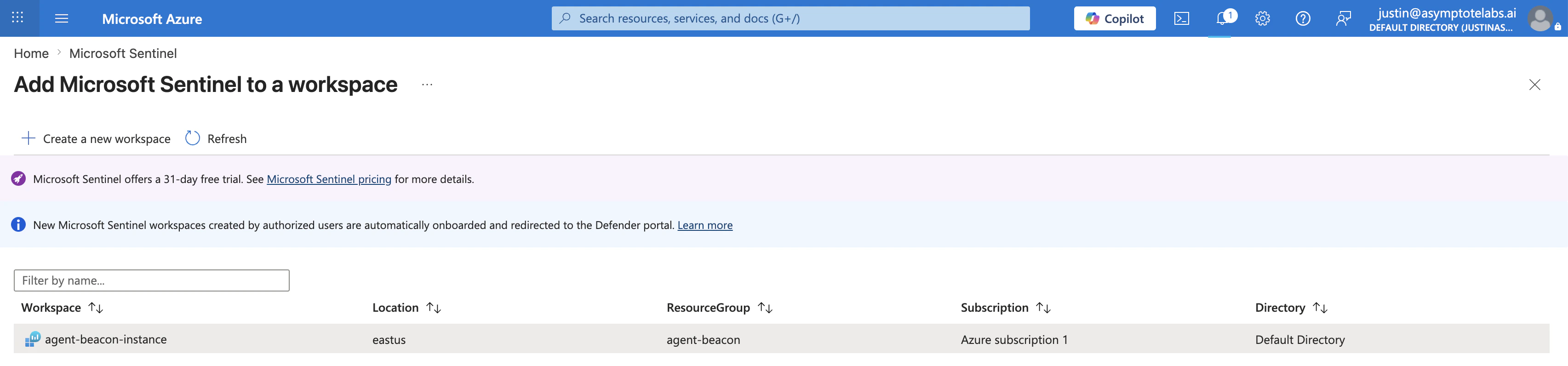
Select the Log Analytics workspace to add to Microsoft Sentinel.
2. Create the Data Collection Endpoint
Create a Data Collection Endpoint in the same region as the Log Analytics workspace. For the example workspace shown here, use:
If Azure says no Data Collection Endpoint exists during the custom log wizard, create this endpoint first, then return to the wizard.
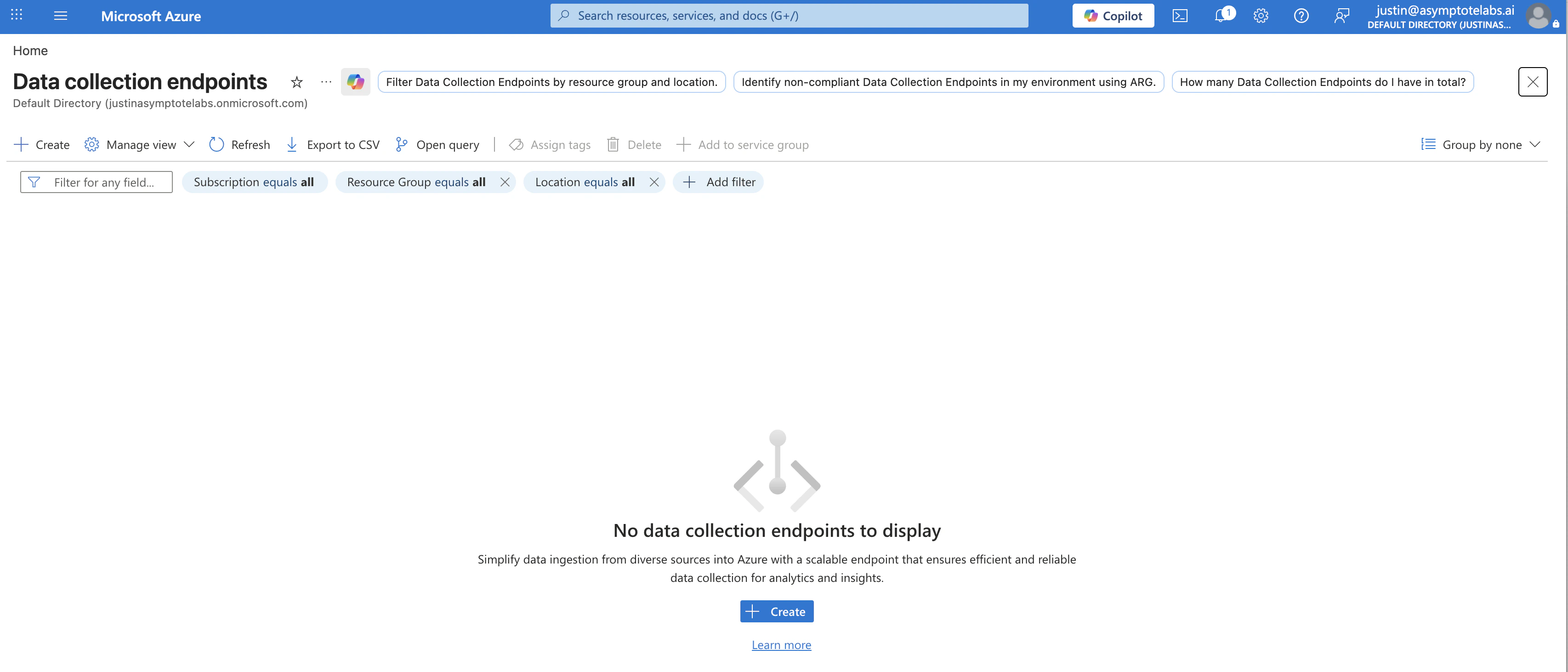
Open Data collection endpoints and create a new endpoint if none exists.
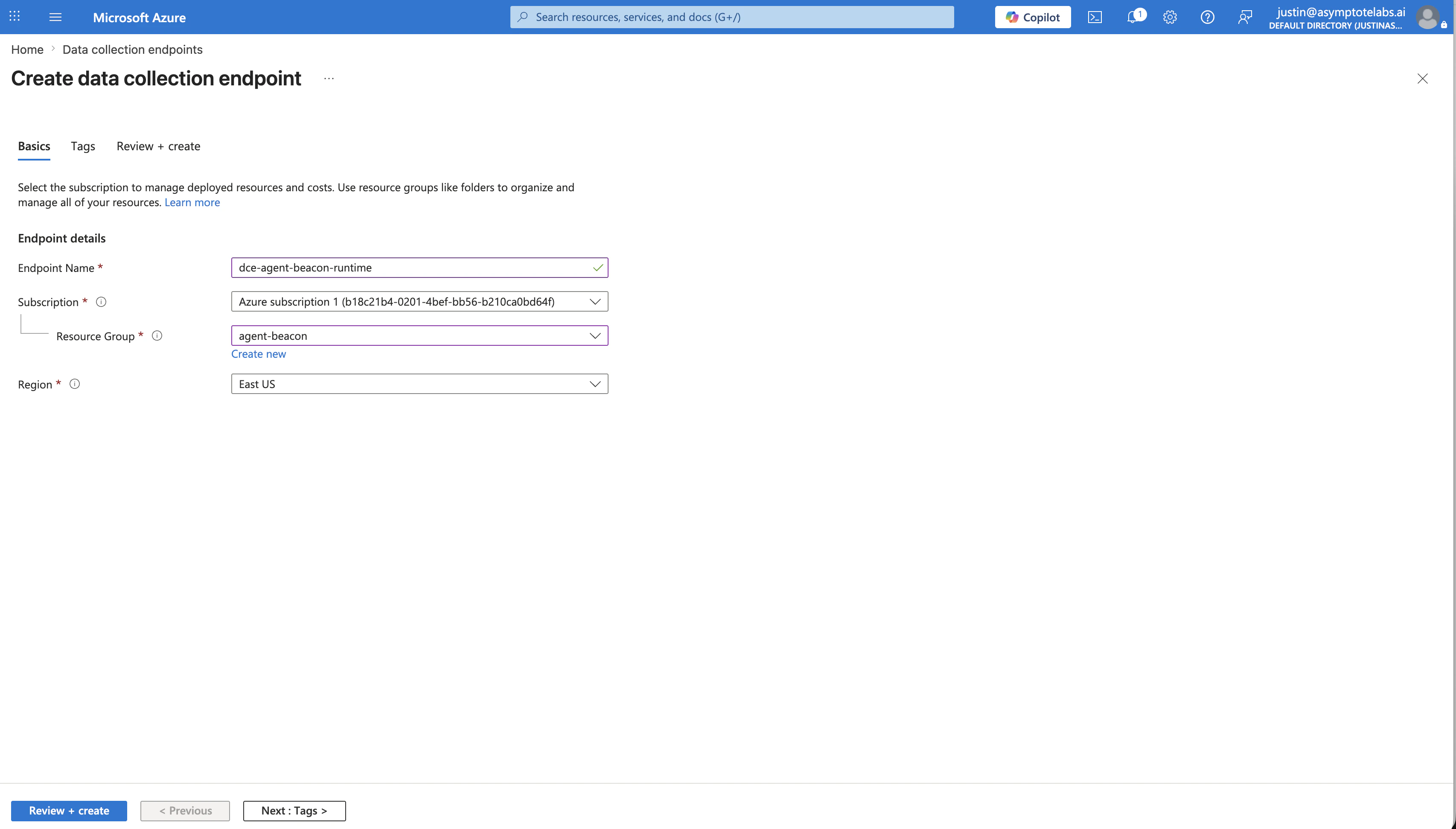
Create the Beacon Data Collection Endpoint in the workspace region.
3. Create the Beacon custom table
Open your Log Analytics workspace, such asagent-beacon-instance, then go to Settings > Tables. If you do not see Tables, use the search box inside the workspace left navigation and search for Tables.
Click Create > New custom log (DCR-based). Use:
Enter the table name as
BeaconRuntime, not BeaconRuntime_CL. Azure adds the _CL suffix automatically, so the final Log Analytics table is BeaconRuntime_CL. If you enter BeaconRuntime_CL, Azure may create BeaconRuntime_CL_CL.
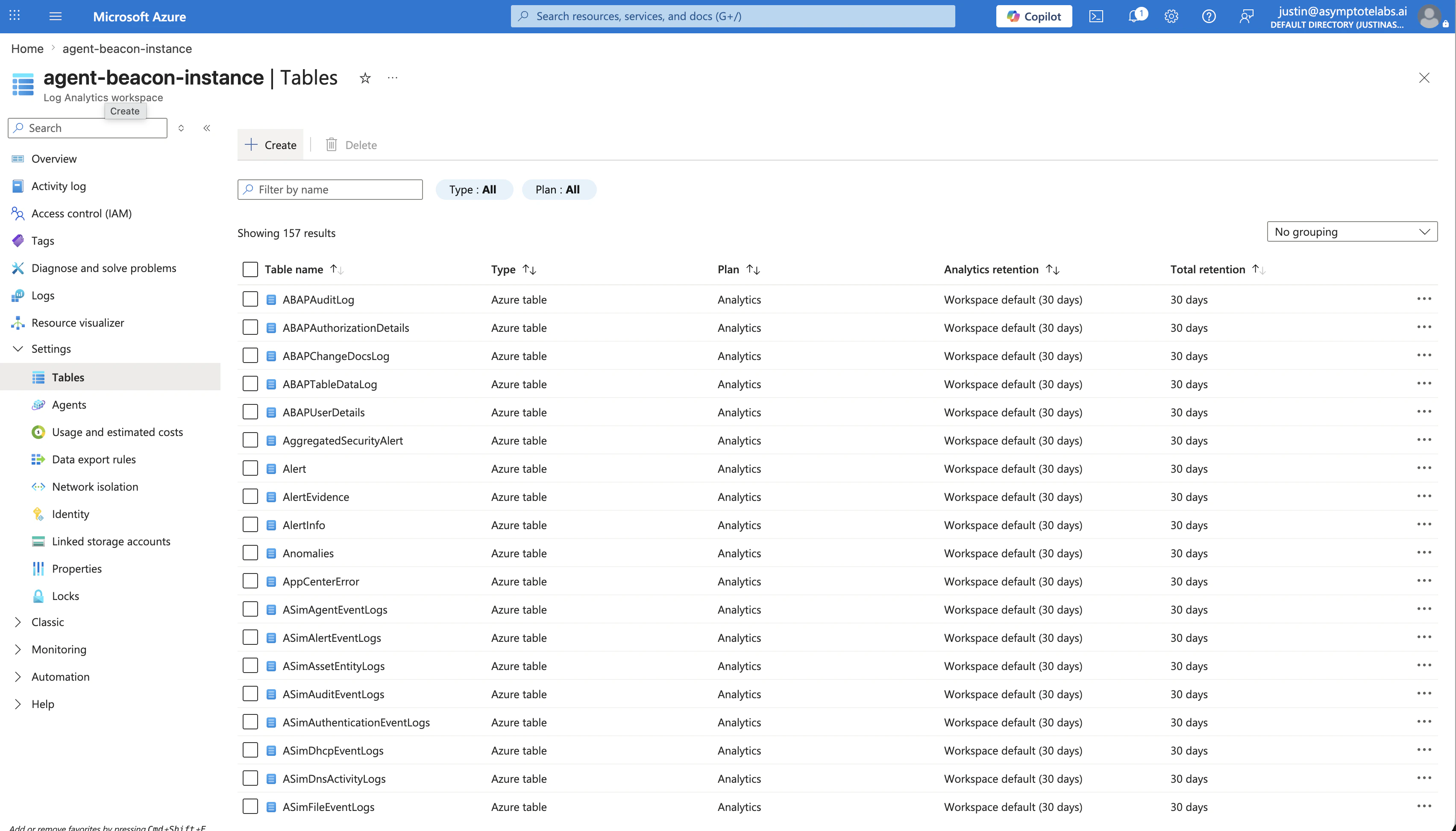
Open the Tables page in the Log Analytics workspace.
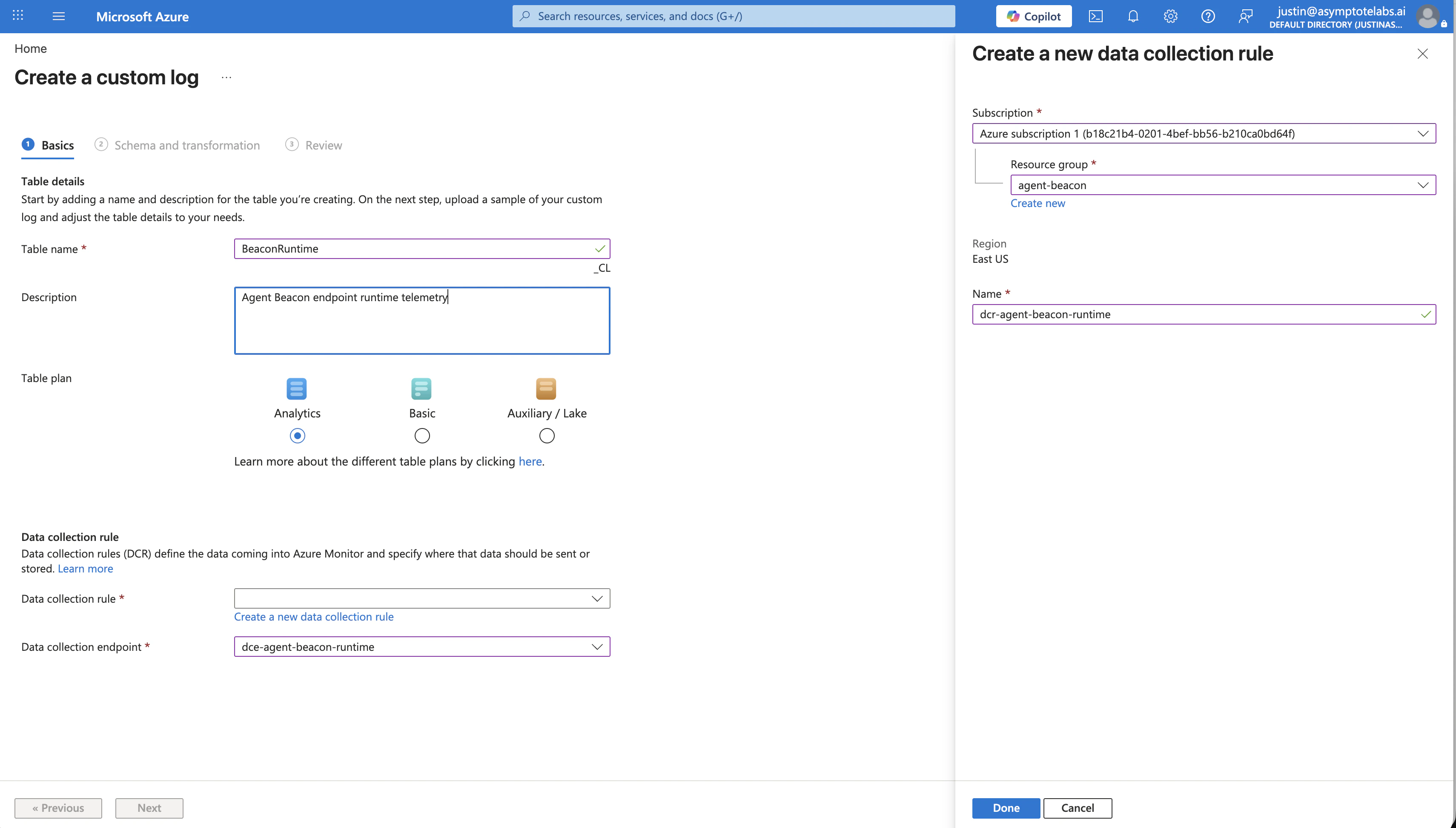
Create the Beacon custom log table and Data Collection Rule.
4. Configure schema and transformation
In the Schema and transformation step, uploadsample-event.jsonl from the generated Sentinel pack. Do not paste table-schema.json into the portal wizard; use it as the reference for the expected columns.
Paste the contents of dcr-transform.kql into the transformation editor and confirm the output columns match the table-schema.json schema. The key columns are:
The DCR uses Custom Text Logs because Beacon writes newline-delimited JSON. The transform parses each
RawData line with todynamic(RawData), projects common hunting columns, preserves the original Beacon event in RawData, and routes output to BeaconRuntime_CL.
5. Choose the ingestion path
Azure Monitor Agent cannot directly tail Beacon logs from macOS endpoints. For macOS fleets, use a small customer-managed forwarder or relay that reads Beacon JSONL records and posts them to the Azure Monitor Logs Ingestion API. For supported Windows or Linux testing, install Azure Monitor Agent on the machine, add a custom text log source pointing to the Beacon runtime log path, usually/var/log/beacon-agent/runtime.jsonl, apply the Beacon DCR transform, route output to BeaconRuntime_CL, and associate the DCR with the machine.
The generated table schema includes columns such as Vendor, Product, EventAction, Severity, HostName, UserName, HarnessName, SessionId, ToolName, CommandLine, Repository, Branch, Message, ContentRetention, and RawData.
Validate forwarding
Confirm the Beacon runtime log exists and has recent endpoint events:Confirm the Beacon runtime log exists and has recent endpoint events
Write a Sentinel validation event
Hunting content
Usequeries.kql for validation and starter hunting queries, including recent Beacon events, command execution, sensitive file edits, high tool-call volume, and new or rare agent runtimes.
Use detections.kql as example analytics rule logic. Review and tune thresholds, repository names, content handling policy, and severity mappings before enabling alerts in production.
CEF, syslog, and direct APIs
Microsoft Sentinel can also collect CEF and Syslog through Azure Monitor Agent, but the generated Beacon pack uses custom logs because Beacon events are rich structured JSON with prompts, tool calls, commands, files, runtime metadata, and optional raw fields. Flattening those events into CEF loses useful context. The Azure Monitor Logs Ingestion API can be useful for a centralized customer-managed forwarder, but it should not be configured directly in Beacon endpoint agent state. Direct API forwarding requires Microsoft Entra credentials, DCR identifiers, ingestion endpoints, batching, retries, and network failure handling. Keep those concerns outside Beacon’s local endpoint collector unless you are building a separate managed forwarder.Content handling
Beacon applies redaction, sanitization, truncation, and event-size limits before events are written toruntime.jsonl and forwarded to Microsoft Sentinel. Review workspace access, table retention, analytics rules, and downstream consumers so retained telemetry matches your approved collection policy.
Related
Jamf and Sentinel
Roll Beacon out to Macs with Jamf Pro and forward runtime events to Sentinel.
beacon endpoint sentinel
Review Microsoft Sentinel command syntax, flags, and examples.
Log forwarding
Review forwarding patterns across Wazuh, Splunk HEC, Falcon LogScale, Elastic, Datadog, Sumo Logic, Rapid7, Microsoft Sentinel, and customer-managed pipelines.
Endpoint event schema
Review normalized Beacon JSONL fields and example events.
Agent harness integrations
Review supported agent harnesses, deployment modes, storage, and forwarding.